Welcome to Part 8 of the blog series on vDefend Security Services Platform and Security Segmentation. In the previous chapters, we demonstrated full and partial hierarchy imports based on the datacenter / application topology and Security Intelligence automated the security tag assignments to workloads, assets and NSX group creation and the necessary infrastructure, environment and application microsegmentation policies.
Hope you might have noticed the naming standard of the inventory assets that were published. Inventory assets and the corresponding NSX groups followed a prescriptive naming standard based on the imported hierarchy. For example, with a full hierarchy import (5 scopes), an application tier asset is named as per the format <Region>_<Zone>_<ENV>_<APP>_<APP_TIER>. While this naming approach is good for greenfield environments, we also have brownfield use cases where application grouping has already been done in NSX manager and we want to onboard these existing security groups to SSP as application or environment assets, retaining the original group names. This process is called NSX Groups Promotion in SSP 5.1 Security Journey, and in this chapter, we are going to discuss this in more detail covering two use cases:
- Promoting NSX groups as Environment assets in SSP
- Promoting NSX groups as Application assets in SSP
If you were not following along, I strongly recommend checking out the previous chapters for full and partial hierarchy imports before proceeding with this chapter:
Part 4: Application Hierarchy Import
https://vxplanet.com/2025/12/22/vdefend-security-services-platform-and-security-segmentation-part-4-application-hierarchy-import/
Part 5: Publishing Assets and Policies
https://vxplanet.com/2025/12/22/vdefend-security-services-platform-and-security-segmentation-part-5-publishing-assets-and-policies/
Part 6: Segmentation Monitoring and Policy Recommendations
https://vxplanet.com/2025/12/23/vdefend-security-services-platform-and-security-segmentation-part-6-segmentation-monitoring-and-policy-recommendations/
Part 7: Partial Hierarchy and Incremental Import
https://vxplanet.com/2026/01/08/vdefend-security-services-platform-and-security-segmentation-part-7-partial-hierarchy-and-incremental-import/
Let’s get started:
Promoting NSX Groups as Environment Assets in SSP
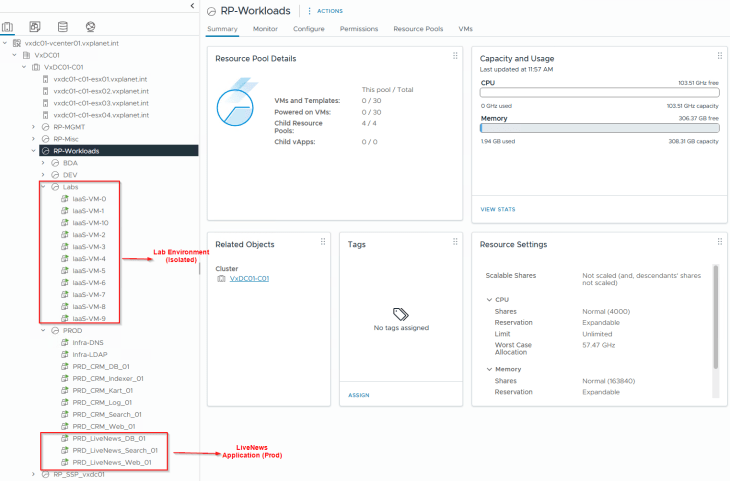
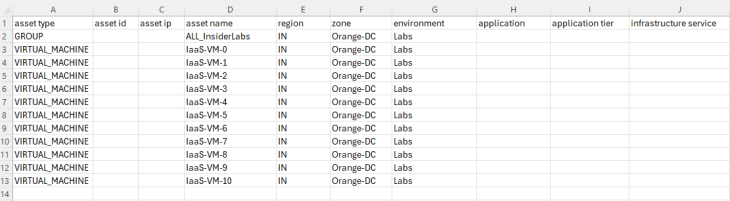
To demonstrate this use case, I have deployed a new environment called “ALL_InsiderLabs” under a new vCenter resource pool called “Labs” alongside Prod, Dev and BDA environments. This Labs environment currently has 10 IaaS lab VMs (subject to scale) and will be completely isolated from the rest of the environments. Microsegmentation is out of scope for this environment, and our objective is limited to environment separation (or zone segmentation).
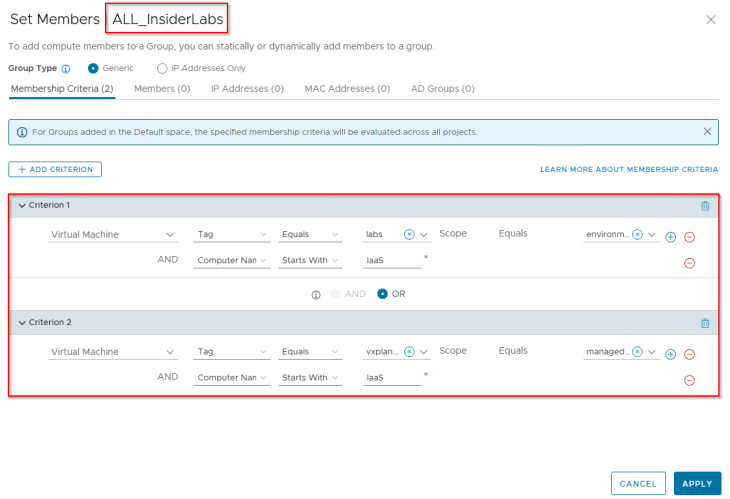
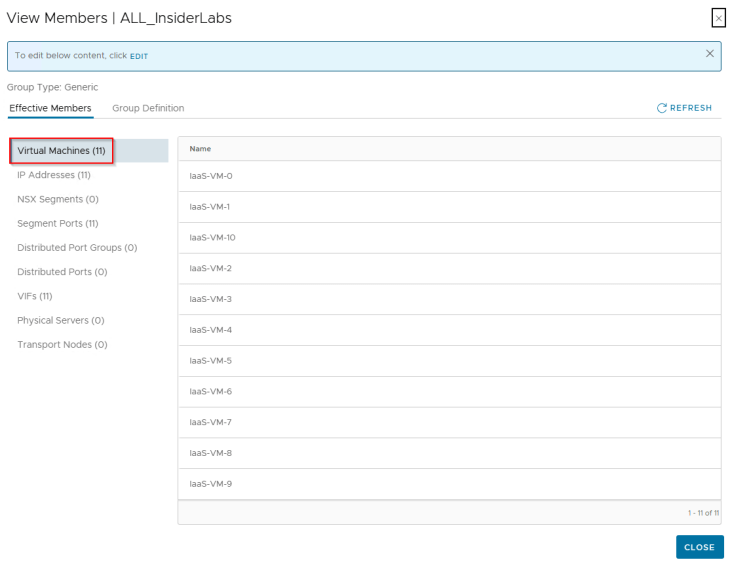
A security group for the Labs environment is created in NSX (called ALL_InsiderLabs) with a dynamic membership criteria based on tags and Computer Name. VMs are assigned with few tags, one tag being “Scope: environment and Tag: labs”. This specific tag is applied purposefully to discuss tag conflicts and resolution while we do the import to SSP.
Importing the Topology
Since the objective is to onboard the NSX group as an environment asset in SSP, we will create a new csv file with a partial hierarchy information, including only the region, zone and environment fields and skipping the application and application tier fields. It is important to include the NSX group along with all the VMs that are expected to be a part of the group, so that SSP can assign the hierarchical tags and match the VMs to the group membership based on the dynamic tag based criteria.
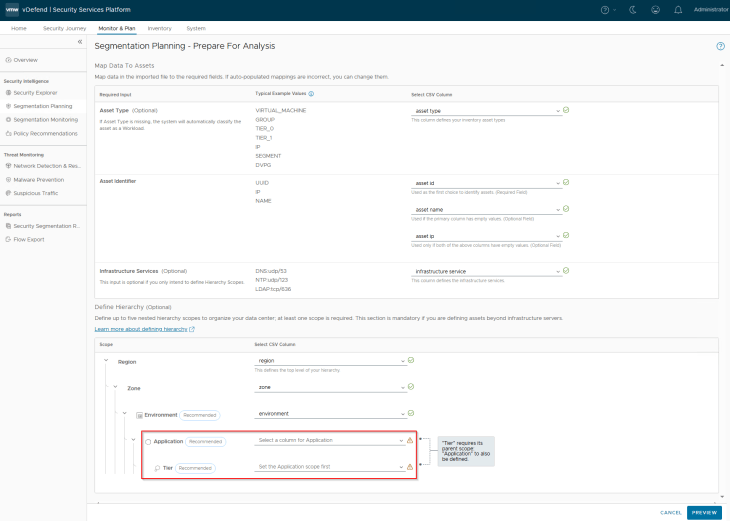
While mapping the column headers, we will leave the application and application tier fields as empty.

Handling Tag Conflicts
After analysis, we are presented with tag conflicts for all the lab VMs. This is because the tag that is already in place on the VMs is “Scope: environment and Tag: labs”, however the imported csv has a hierarchy column for “environment” with value “Labs” (with uppercase L), resulting in a conflict. Tag conflicts is one common situation that can be expected in these brownfield NSX group imports.
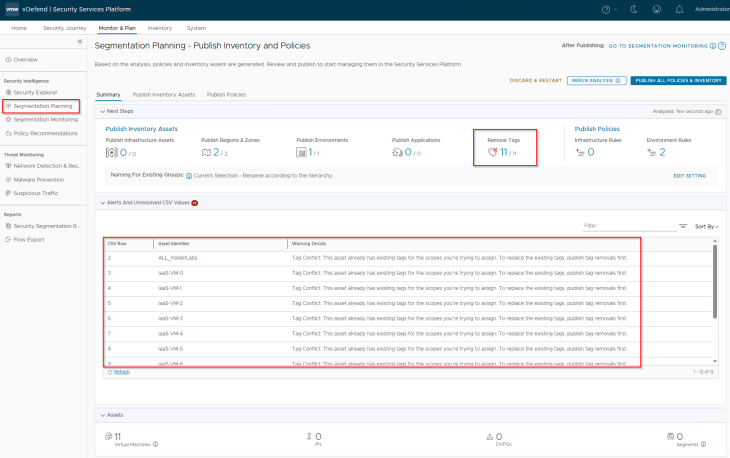
Let’s remove the conflicting tags before we proceed.
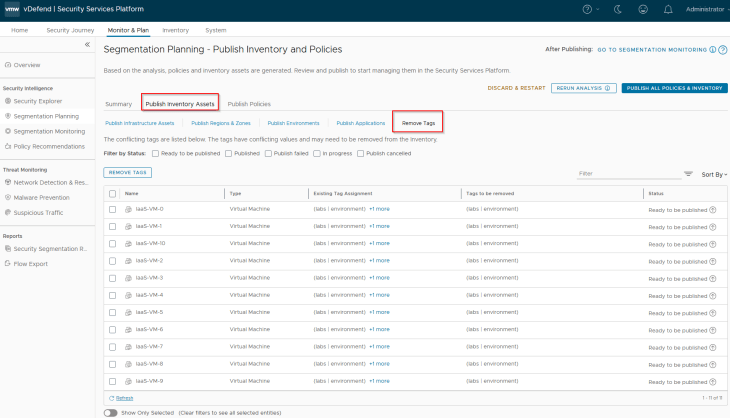
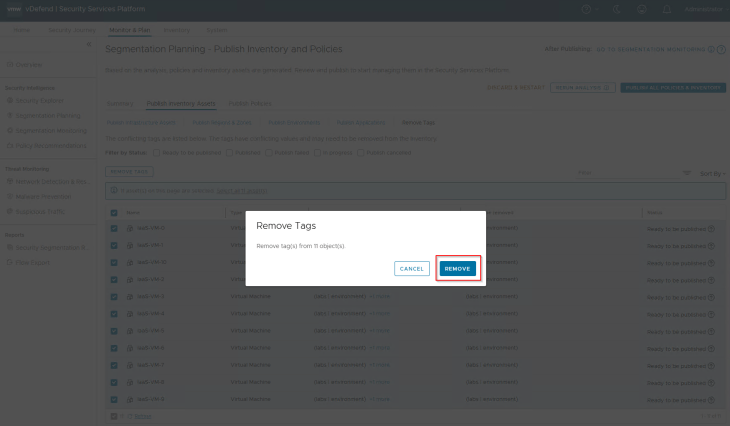
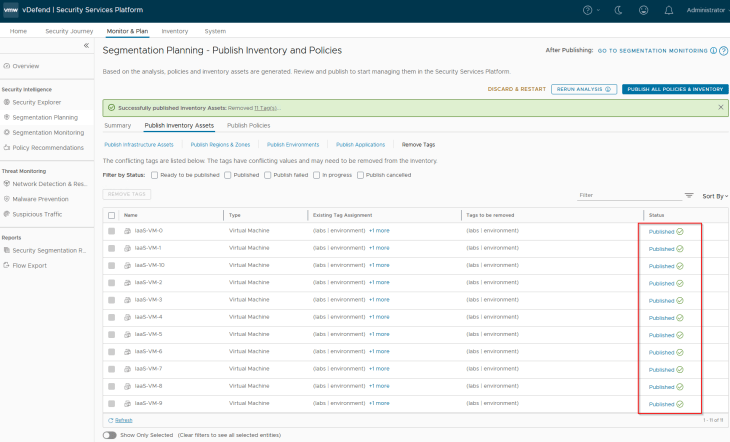
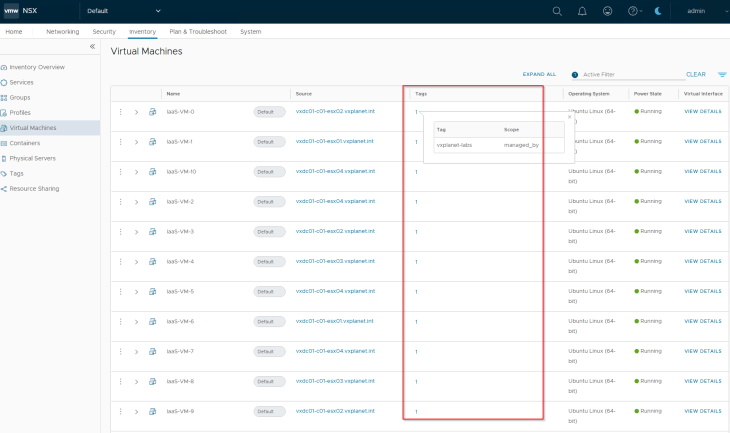
and we can confirm from NSX inventory that the conflicting tag is removed from the VMs
Publishing Inventory Assets
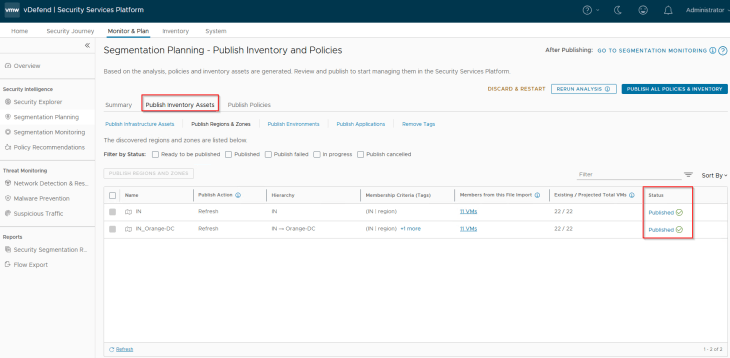
Since the Region and Zone assets were already existing in SSP as part of previous hierarchy import, we see the publishing action as Refresh. This publishing action will update the VMs with Region and Zone tags (as highlighted below)

Before we publish the Environment asset, we have a decision to make:
- Whether to retain the name of the NSX group OR
- Rename the NSX group as per the defined hierarchy.
Since our requirement is to maintain the existing group name, we will choose the first option
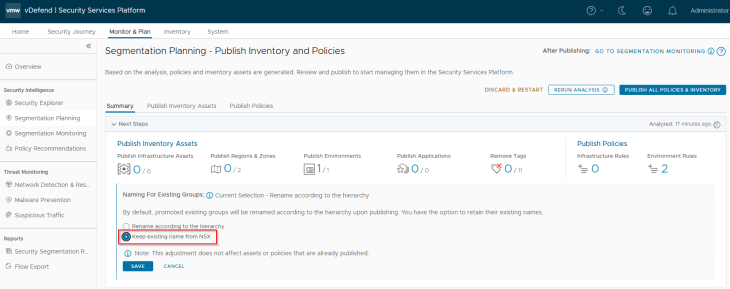
and we will now publish the Environment asset. Notice that the publishing action is “Promote”.


If we check the SSP Inventory for environment assets, we see that the existing NSX group name is preserved.
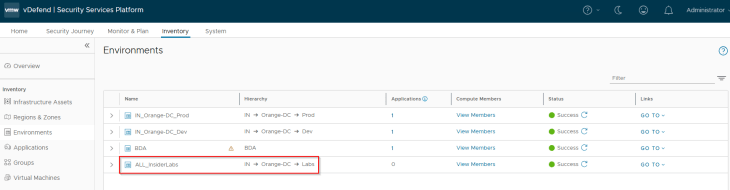
We should also see a new environment tag assigned to the VMs (Scope: environment and Tag: Labs) which was earlier removed as part of tag conflict resolution (Scope: environment and Tag: labs)
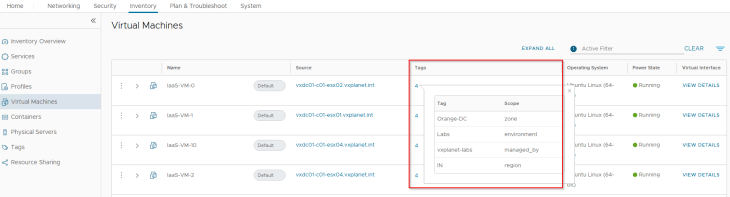
and a new dynamic criteria is added to the group to match and include the VMs that were a part of the csv import process.
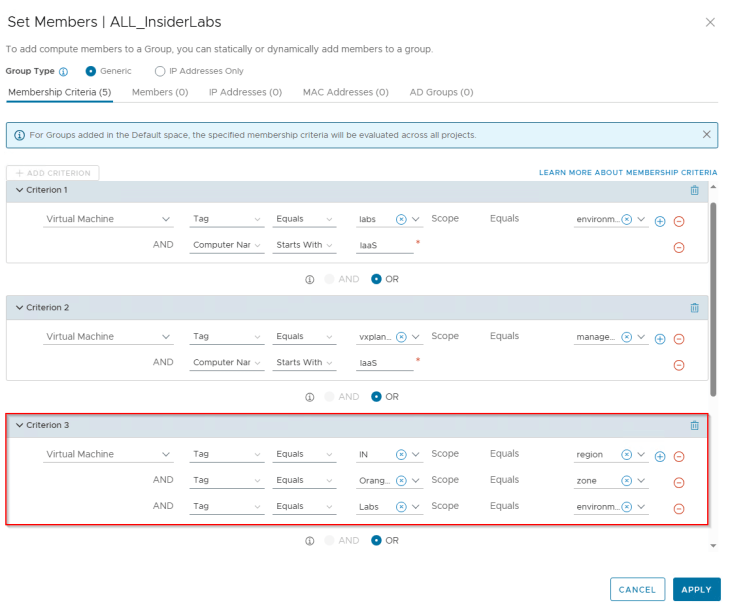
Publishing Environment Policies
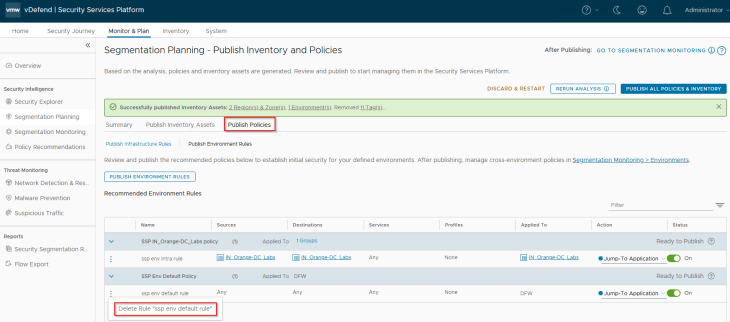
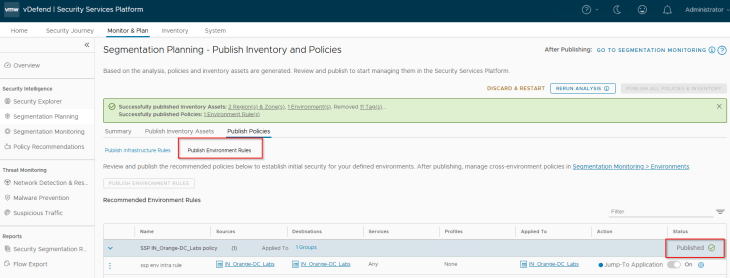
Since we are promoting NSX group as an Environment asset, we won’t have any infrastructure or application policies to publish. Let’s publish the intra-environment policy for the Labs environment. Note that this rule has an action of “Jump to Application” which can’t be modified from SSP. The environment category default rule was already created in the previous chapter, hence we can delete the same from the recommendation.
Note: When we publish the Intra-environment policy, the rule action is “Jump to Application”. This need to be changed to “Allow” from NSX manager once the policy is published.
Because we onboarded a new environment, we have the below 6 environment pairs for create inter-environment policies.
- ALL_InsiderLabs to Prod
- Prod to ALL_InsiderLabs
- ALL_InsiderLabs to Dev
- Dev to ALL_InsiderLabs
- ALL_InsiderLabs to BDA
- BDA to ALL_InsiderLabs
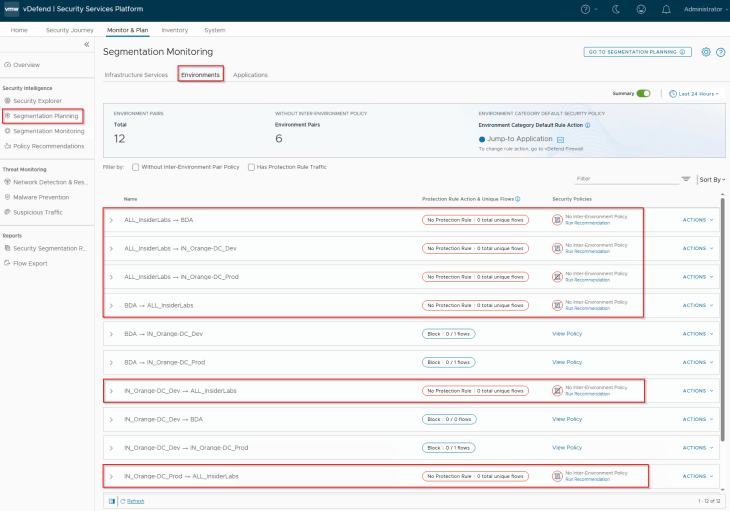
As discussed previously, this Labs environment is completely isolated with no inter-environment flows, hence it’s safe to implement inter-environment protection rules with an action of Deny
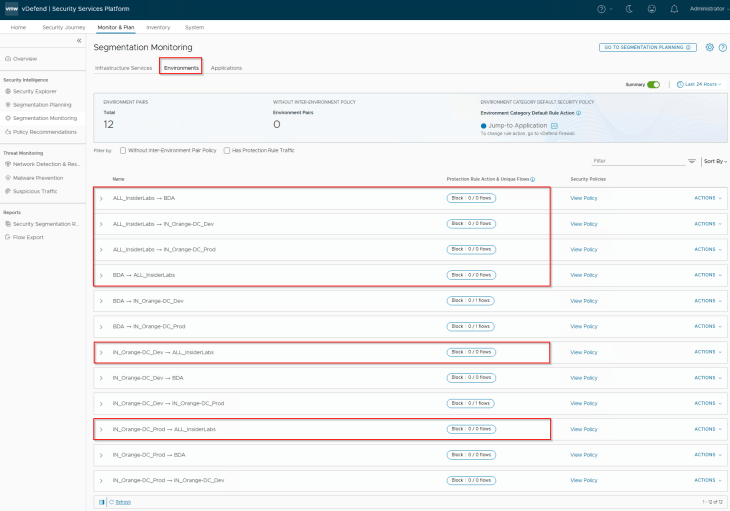
We will now publish the policies to NSX manager.
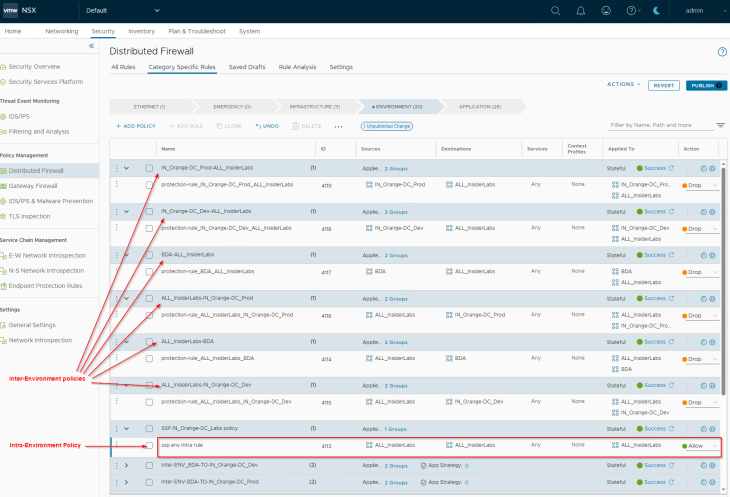
Finally, for the published intra-environment policy, we will change the rule action from “Jump to Application” to “Allow” to facilitate zone segmentation. Otherwise, traffic will be evaluated against application category rules which is not intended.

Now let’s discuss the next use case where we promote an NSX group as an application asset in SSP.
Promoting NSX Groups as Application Assets in SSP
To demonstrate this use case, I have deployed a new application called “LiveNews” in the already existing Prod environment. This is a simple standalone application and don’t have interdependency with any of the previous applications that we deployed.
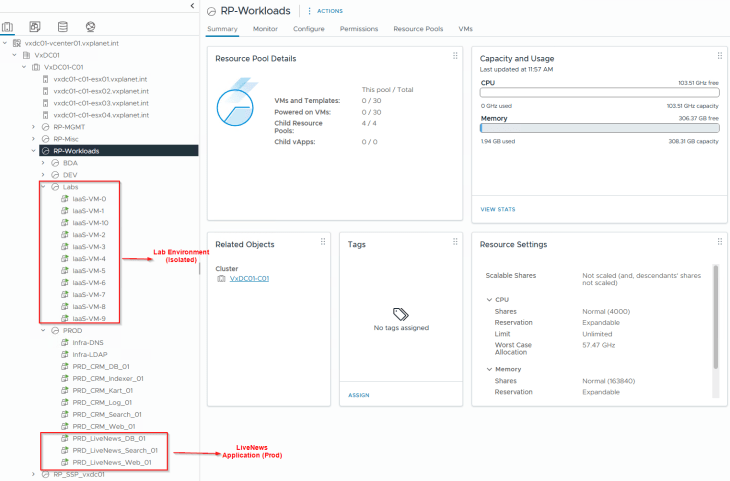
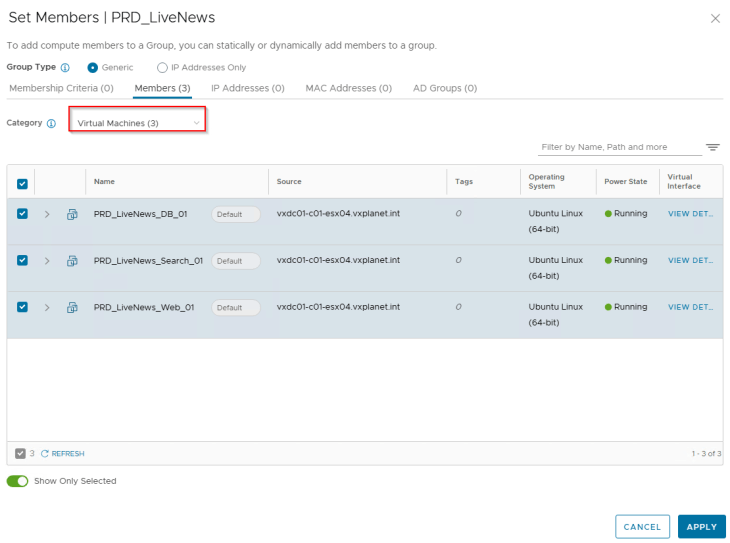
We have pre-created a security group for this application called “PRD_LiveNews” in NSX manager with a static membership. Security groups for the tiers are not created, and will be done by SSP as part of csv import.
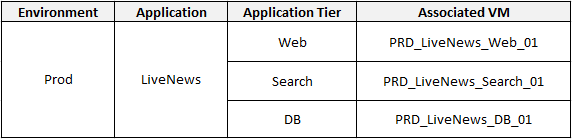
The below table shows the application details, tiers and the VMs that make up the application.
Importing the Topology
Since the objective is to onboard the NSX group as an application asset in SSP, we will create a new csv file with a full hierarchy information, including all the 5 hierarchical scopes. It is important to include the NSX group along with all the VMs that are expected to be a part of the group, so that SSP can assign the hierarchical tags and match the VMs to the group membership based on the dynamic tag based criteria.

We will map the csv column headers with the respective fields.

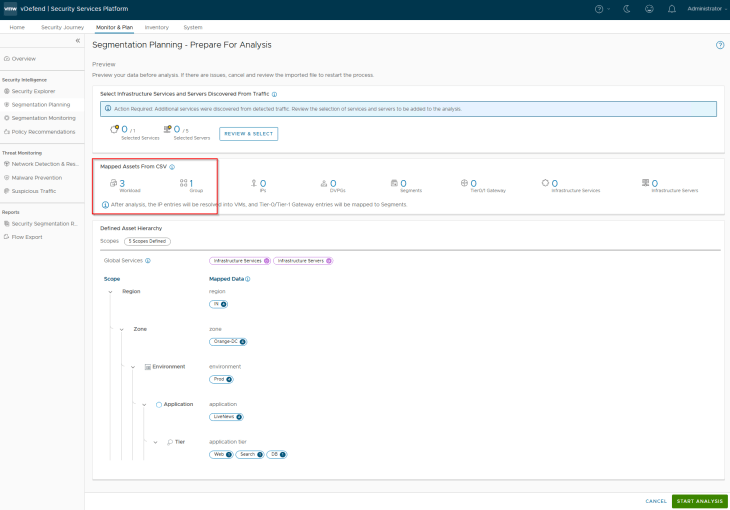
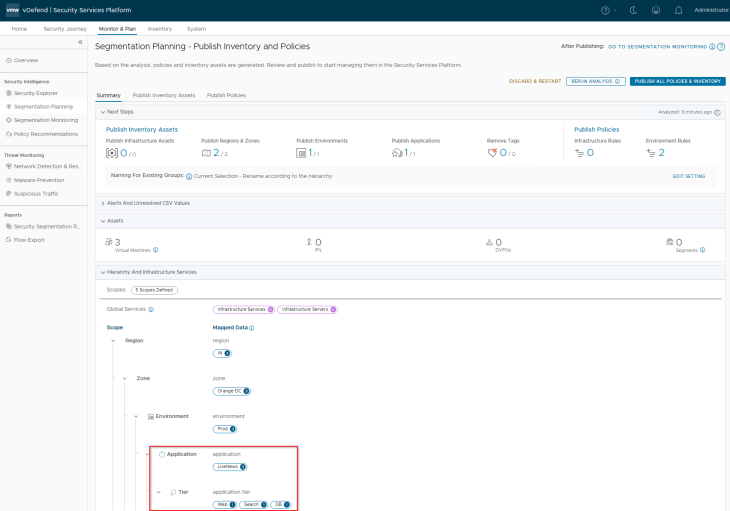
Since we haven’t applied any tags to the VMs in NSX, we won’t see any tag conflict situation.
Publishing Inventory Assets
Since the Region, Zone and Environment assets were already existing in SSP as part of previous hierarchy import, we see the publishing action as Refresh. This publishing action will update the VMs with Region, Zone and Environment tags (as highlighted below)
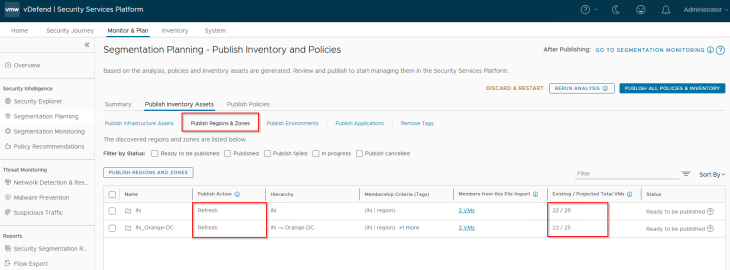
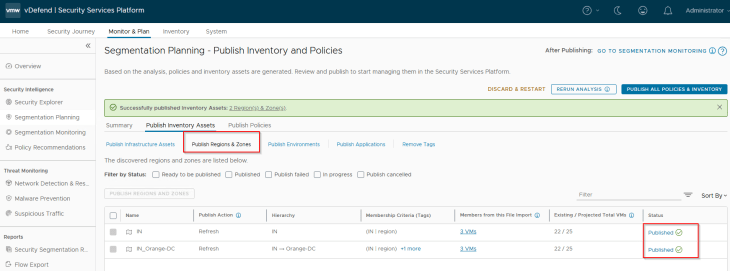
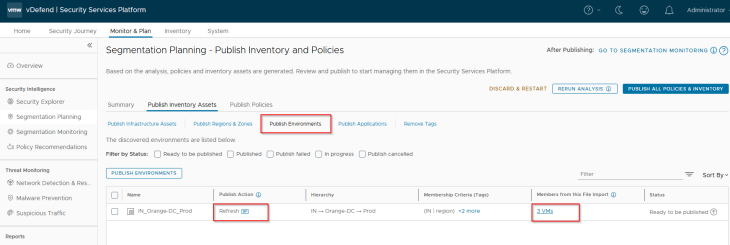
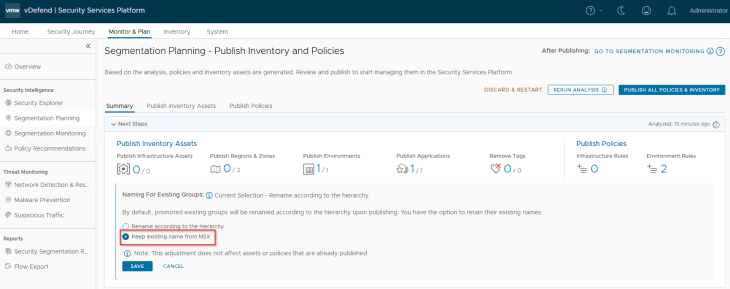
As previously, before we publish the Application asset, we have a decision to make:
- Whether to retain the name of the NSX group OR
- Rename the NSX group as per the defined hierarchy.
Since our requirement is to maintain the existing group name, we will choose the first option.
We will now publish the Application asset. Notice that the publishing action is “Promote”.
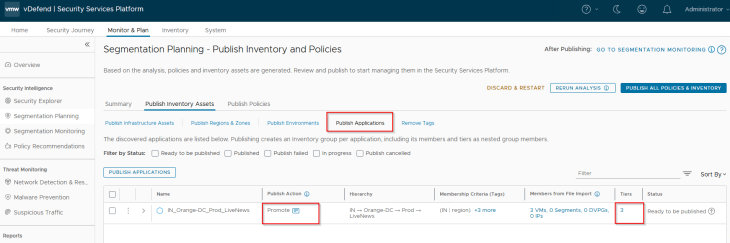
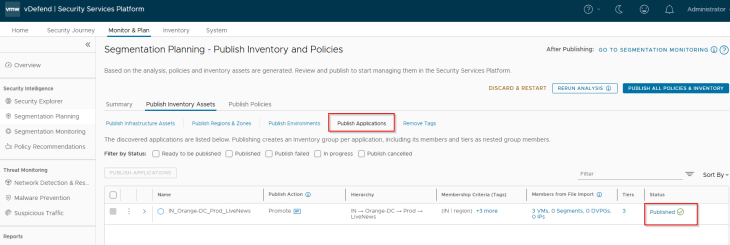
Since we didn’t pre-create the security groups for application tiers in NSX, we didn’t provide it’s asset information during csv import. Hence application tiers are created based on the prescriptive hierarchy naming format.
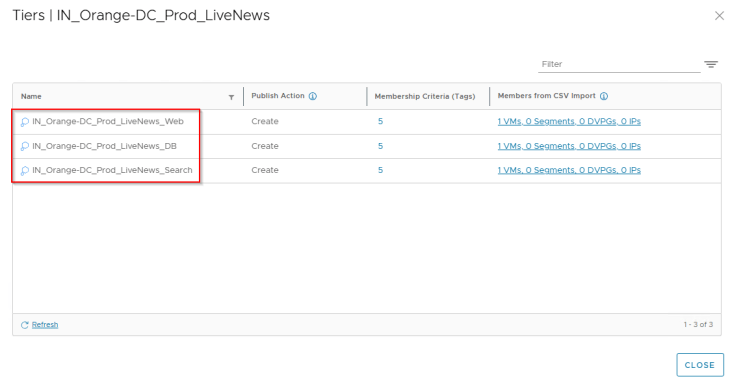
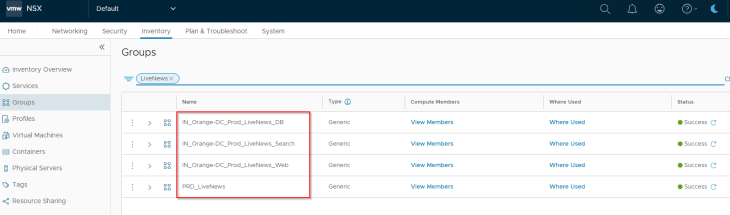
If we check the NSX Inventory, we see that the existing application group name is preserved and the application tier groups are created.
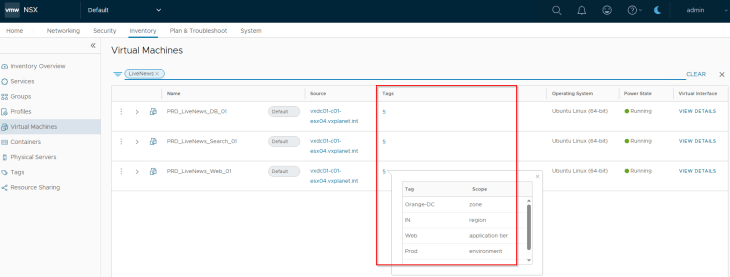
We should see all the five tags assigned to the VMs.
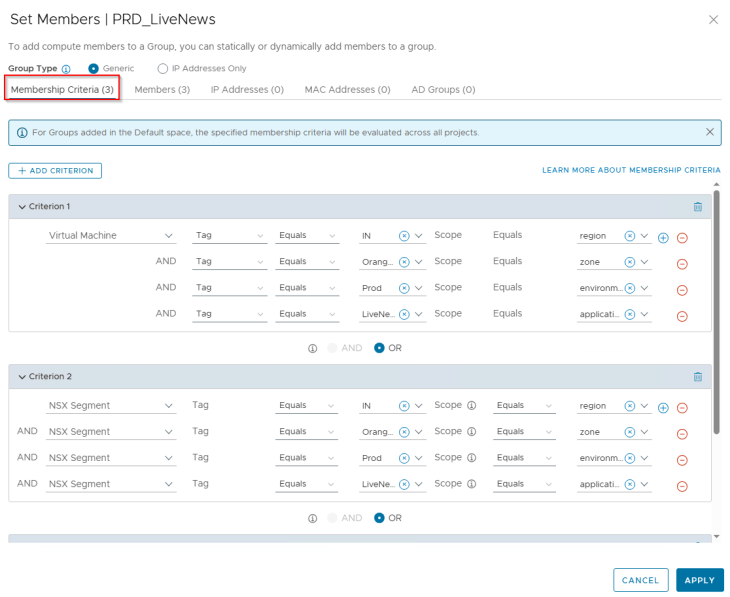
NSX groups for application and application tiers will have a dynamic tag based criteria to match and include VMs that were a part of the csv import process
Publishing Application Microsegmentation Policies
Let’s review the flows for the LiveNews application. We see that flows to shared infrastructure services are allowed as we already had the necessary infrastructure policies in place.
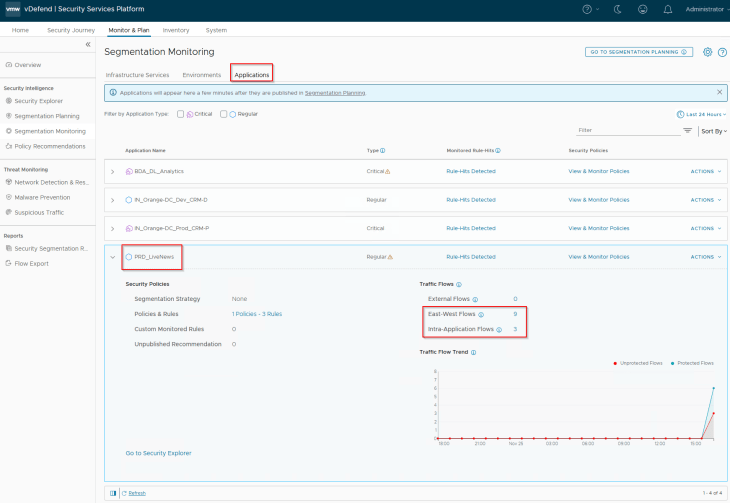
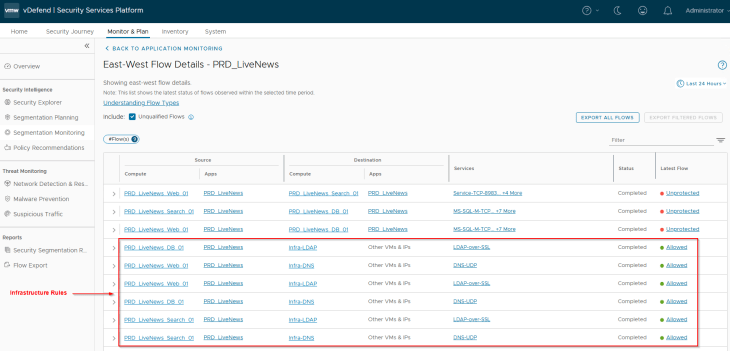
We will now run a recommendation and include a segmentation strategy with a default Deny rule (as we are confident about the expected flows of the application)
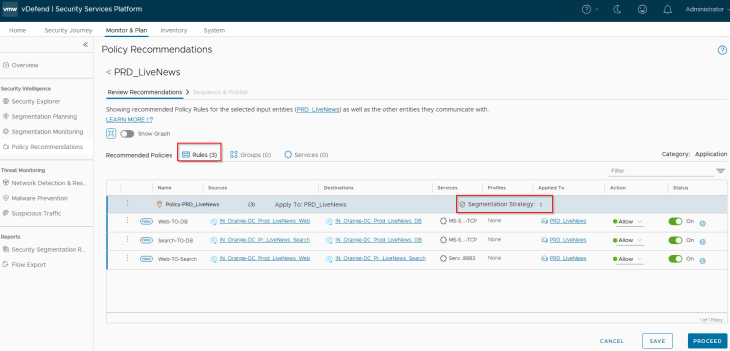
We will publish the recommendation to NSX manager.
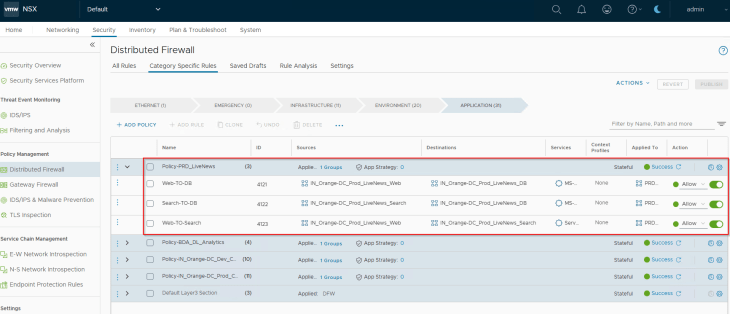
And finally, we will review the Security Explorer canvas for any unprotected flows.
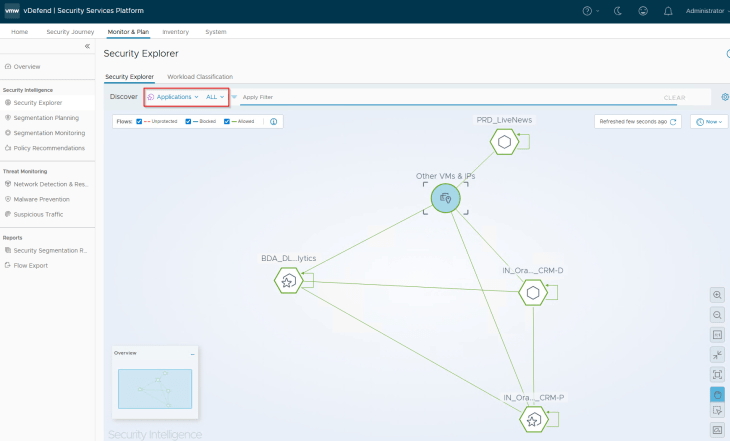
Excellent!!! We have successfully promoted NSX security groups as SSP inventory assets and secured them based on their security boundary requirements. I know this has been a lengthy read as we need to go over the process in detail but I hope this was informative.
We have two more scenarios to cover, which is about application scale-out and application transitions, but we will take a break now and meet again in the next chapter.
Stay tuned!!! Thanks for reading.

Continue Reading? Here are the other parts of this series:
Part 1: Introduction
https://vxplanet.com/2025/12/18/vdefend-security-services-platform-and-security-segmentation-part-1-introduction/
Part 2: Platform Deployment
https://vxplanet.com/2025/12/19/vdefend-security-services-platform-and-security-segmentation-part-2-platform-deployment/
Part 3: NSX Onboarding and Feature Activation
https://vxplanet.com/2025/12/19/vdefend-security-services-platform-and-security-segmentation-part-3-nsx-onboarding-and-feature-activation/
Part 4: Application Hierarchy Import
https://vxplanet.com/2025/12/22/vdefend-security-services-platform-and-security-segmentation-part-4-application-hierarchy-import/
Part 5: Publishing Assets and Policies
https://vxplanet.com/2025/12/22/vdefend-security-services-platform-and-security-segmentation-part-5-publishing-assets-and-policies/
Part 6: Segmentation Monitoring and Policy Recommendations
https://vxplanet.com/2025/12/23/vdefend-security-services-platform-and-security-segmentation-part-6-segmentation-monitoring-and-policy-recommendations/
Part 7: Partial Hierarchy and Incremental Import
https://vxplanet.com/2026/01/08/vdefend-security-services-platform-and-security-segmentation-part-7-partial-hierarchy-and-incremental-import/


