
In the modern AI era of threat defense, we are not just defending against human adversaries, but also with the frontier AI era of autonomous exploits designed to bypass perimeter security, discover, chain and exploit software vulnerabilities and spread laterally at machine speeds. A proper defense mechanism against AI-driven attacks requires visibility and a deep multi-layered security approach to workload protection centered around two critical capabilities:
- Virtual Patching: Shielding vulnerable workloads from AI-driven exploits by blocking malicious traffic at the network level rather than on the machine itself, thus providing sufficient time to patch the underlying systems.
- Malware Sandboxing: Using a sandboxing environment to safely detonate and analyse zero-day payloads that has bypassed signature-based controls.
VMware vDefend security stack delivers on these requirements by natively integrating with VCF for traffic visibility, security automation and the necessary tools for advanced threat investigation and prevention.
- At the foundation, vDefend Distributed Firewall (DFW) enforces granular micro-segmentation to isolate workloads and restrict lateral movement, complemented by Gateway Firewall (GFW) for North-South security and zone segmentation.
- Layered above is the Intrusion Detection and Prevention System (IDPS), which inspects the traffic to detect and block exploit attempts.
- Initial access attempt by adversaries is controlled by Malware Prevention Service (MPS) which utilizes a fully on-premise sandboxing environment to safely detonate and block zero-day attacks before they reach critical assets.
- Furthermore, any behavioural anomalies or suspicious activities are detected by Network Traffic Analysis (NTA).
- Network Detection and Response (NDR) then correlates events to a time-series campaign, visualizing the complete lifecycle of an attack chain.
- Finally, the analytics layer, Security Intelligence (SI) provides complete flow visibility and security automation for the workloads.
While the complete VMware vDefend stack offers comprehensive security, this blog series focuses specifically on the Malware Prevention Service (MPS). With the release of vDefend Security Services Platform 5.2, the sandboxing environment is now fully on-premise and this series will provide the necessary guidance to successfully design and deploy MPS and the on-premises sandbox environment within VCF.
Here is the breakdown of the series:
Part 1: Distributed Malware Prevention and Sandboxing Architecture
Part 2: Distributed Malware Prevention and Sandboxing Deployment
Part 3: ATP Policies and Threat Prevention
Let’s get started:
Malware Prevention Service Enforcement Points
vDefend Malware Prevention Service (MPS) has multiple deployment models known as Enforcement Points. The enforcement points dictate where exactly the files are intercepted and analyzed, and this depends on workload domain design and use-cases.
Distributed Enforcement Model
In a distributed MPS enforcement model, both malware detection and prevention is supported for Windows and Linux endpoints. This is achieved via Guest Introspection module of the thin agent (VMTools) installed on the endpoints. This module intercepts and sends files to the dedicated SVM (MPS service VM) on the ESXi host for static analysis. If a verdict cannot be determined during this static analysis phase, the files will be sent to the sandboxing environment for deep analysis (detonation).
Centralized (Gateway) Enforcement Model
In a centralized (gateway) enforcement model, only malware detection is supported. Gateway enforcement leverages the IDS/IPS engine on the NSX Edge cluster for static analysis, and is intended for traffic traversing a zone boundary.
NDR Sensor based Enforcement Model
For ESXi host clusters that are not prepared with NSX, or those managed by standalone vCenter servers, vDefend utilizes Network Detection and Response (NDR) sensors. NDR sensors inspect, detect and forward threat events to the centralized NDR console within the vDefend Security Services Platform. Similar to gateway enforcement, NDR sensor-based enforcement supports malware detection only.
The focus of this three-part blog series is on the Distributed Enforcement Model of the Malware Prevention Service.
Distributed Malware Prevention Service Architecture
Starting with vDefend Security Services Platform 5.2, the entire malware analysis pipeline is now on-premise. The sandboxing environment runs on dedicated on-premise vSphere host clusters ensuring strict data locality and eliminating any data privacy concerns. The analysis pipeline has two phases:
Static Analysis:
Static Analysis is performed on dedicated SVMs on the ESXi hosts and vDefend Security Services platform based on known malware signatures. This analysis leverages vDefend Threat Intelligence Service (vTIS) updates that are downloaded regularly (online or offline), based on the latest threats. Static analysis inspects the file based on vTIS signatures without executing it. If a verdict (Benign or Malicious) cannot be determined in this phase, the file is sent for deep analysis / sandboxing.
Deep Analysis:
This phase comes into play only if a verdict cannot be determined in the static analysis phase. In this phase, the file is sent to a separate on-premise sandboxing / detonation vsphere cluster where it is executed in a secure and isolated environment to analyse the runtime behaviour. This phase is vital to detecting zero-day threats that do not have any known signatures.
Depending on the SSP connection mode (connected / disconnected mode), the sandboxing cluster may have additional network configuration to allow controlled internet access for effective malware detonation:
Architecture – MPS Connected Mode
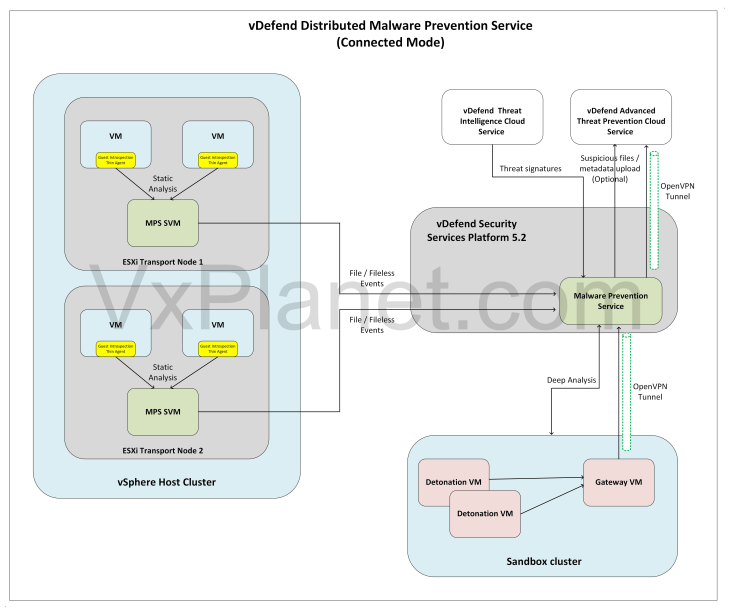
When Malware Prevention Service is enabled in SSP Connected mode:
- SSP connects to vDefend Threat Intelligence Service (vTIS) to download the latest threat signatures.
- File detonation activities are performed by detonation VMs that are deployed on-demand when files are send to the sandboxing cluster. The detonation VMs are deployed on a completely isolated network.
- A Gateway VM is deployed within the MPS sandboxing cluster. This VM establishes a secure OpenVPN tunnel with the vDefend Advanced Threat Prevention Cloud Service via the SSP platform. This controlled internet access is essential to mimic the malware and observing full malware behavior, such as call-backs to Command and Control (C2) servers.
- To maintain strict network isolation during detonation, Gateway VM utilizes a separate network attached to the isolation network where detonation VMs are deployed. This network acts as the default gateway for the detonation VMs, ensuring that any outbound malware traffic is safely routed to the internet exclusively through the OpenVPN gateway.
A detailed network architecture for the sandboxing cluster is covered later in this article. The architecture diagram below illustrates the MPS Connected mode deployment:
Architecture – Disconnected Mode
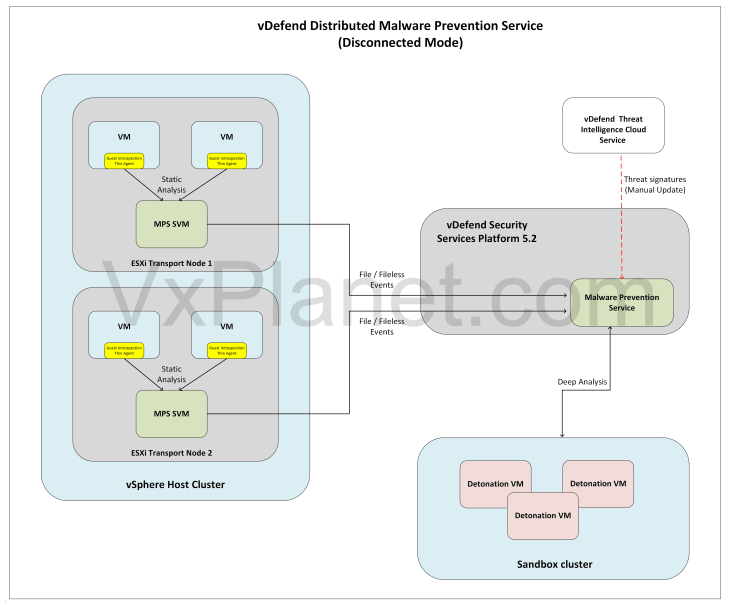
When Malware Prevention Service is enabled in SSP Disconnected mode:
- SSP is deployed in air-gapped environment and doesn’t have access to external cloud services. Threat signatures need to be manually downloaded from vDefend Threat Intelligence Service (vTIS) portal and uploaded to Security Services Platform on a regular basis.
- Gateway VM is not deployed on the MPS Sandboxing vSphere cluster, and file detonation happens without controlled internet access. Hence in some scenarios, we may not trick the malware from exhibiting it’s true behaviour.
- Detonation VMs are deployed on a separate isolated network that doesn’t have reachability to other internal networks.
The architecture diagram below illustrates the MPS Disconnected mode deployment.
Sandboxing Cluster Design
The sandboxing cluster is a dedicated, on-premises vSphere cluster. For optimal isolation, it is highly recommended to manage this cluster using a separate vCenter Server from the one configured in the Security Services Platform (SSP).
- Sandboxing cluster requires atleast two ESXi hosts for HA, either managed by a separate vCenter server or by the same vCenter server where SSP is deployed. Having a dedicated vCenter server for the sandboxing cluster is the recommended design option.
- The sandboxing cluster doesn’t require NSX networks. If the cluster is already prepared with NSX, an isolated overlay segment can be used for the detonation VM networking.
- Sandboxing cluster should have a shared storage – vSAN or NFS
- Sandboxing cluster has specific DRS / HA requirements. vSphere DRS must be enabled with Automation Level set to Manual and vSphere HA set to OFF.
- Sandboxing cluster has networking requirements to support Gateway VM (in Connected mode) and detonation VMs. The below VLANs / Portgroups are required and recommended on separate VDS’es:
- Gateway VM Management: This is the management network of Gateway VM and requires reachability to SSP network. This network is needed only in Connected mode. OpenVPN tunnel to SSP is established over this network, and should be able to connect to the OpenVPN server running on SSP over port UDP 1194. This network can be on the same VDS used for ESXi management / vSAN / vMotion.
- Malware Detonation VM Network: This is a completely isolated network used by the detonation VMs. It’s recommended to have this network on a separate VDS with physical isolation, if possible.
The diagram below illustrates the network architecture of the sandboxing cluster in connected mode.
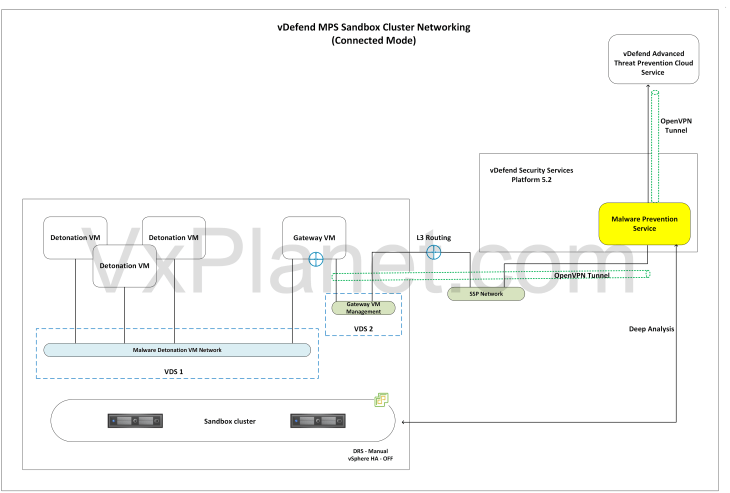
Assuming MPS is deployed in connected mode, a typical sandboxing workflow operates as follows. Note that Gateway VMs are only utilized in connected mode and are not deployed in disconnected mode.
- Whenever a file is submitted for deep analysis, detonation VMs are provisioned on-demand as instant clones. They reside on the isolated detonation network, with their default gateway pointing directly to the Gateway VM.
- The Gateway VM establishes an OpenVPN tunnel with the VPN server deployed in SSP. In turn, SSP establishes an OpenVPN tunnel with vDefend Advanced Threat Prevention cloud services to route malware traffic securely.
- The Gateway VM routes traffic from the isolated detonation network over the VPN tunnel using NAT. If the detonated malware attempts to communicate with external Command & Control (C2) servers, this activity is strictly contained within the secure tunnel, fully masking the enterprise’s real public IP address.
- Once a detonation activity is completed, a verdict is calculated and the instant clones are deleted. The analysis information and verdict is stored in SSP and is used for subsequent static analysis of similar files.
MPS Sandboxing Deployment Options in VMware Cloud Foundation
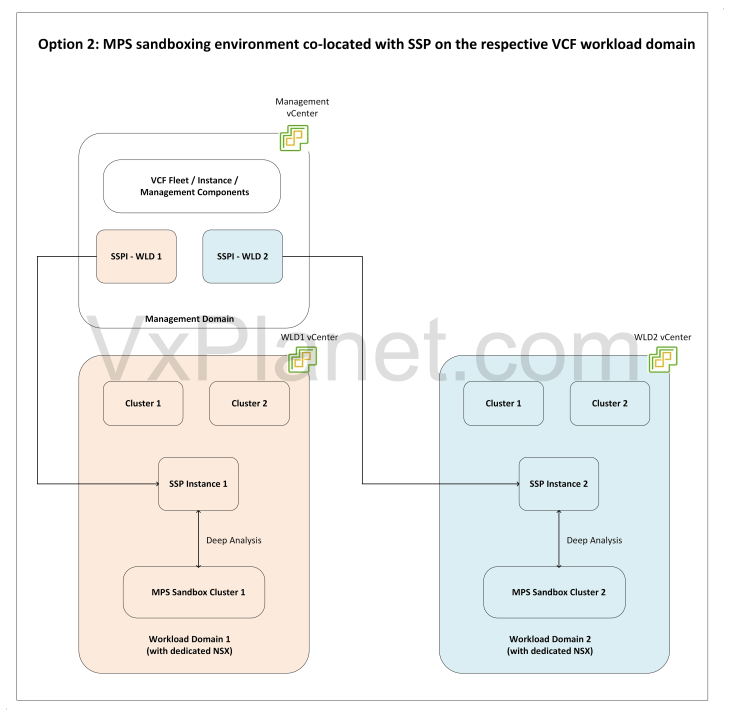
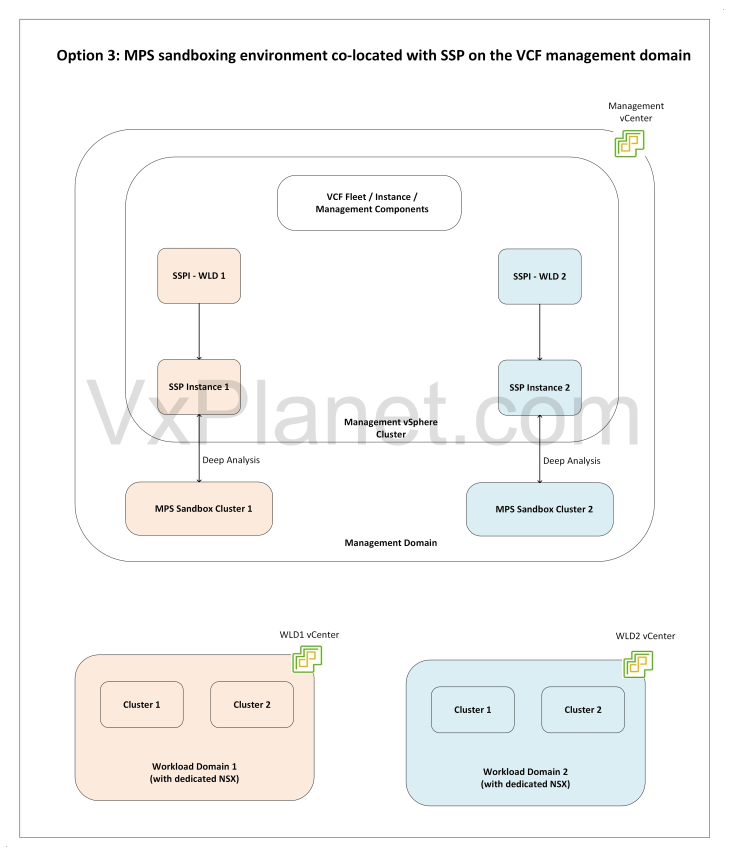
- As of SSP 5.2, there is a 1:1 mapping between an NSX manager instance with an SSP instance. Consequently, if each VCF workload domain utilizes a dedicated NSX Manager cluster, a separate SSP instance must be deployed for each domain.
- Following this architectural mapping, each deployed SSP instance requires its own dedicated MPS sandboxing cluster.
There are three deployment options for the MPS sandboxing environment in VCF.
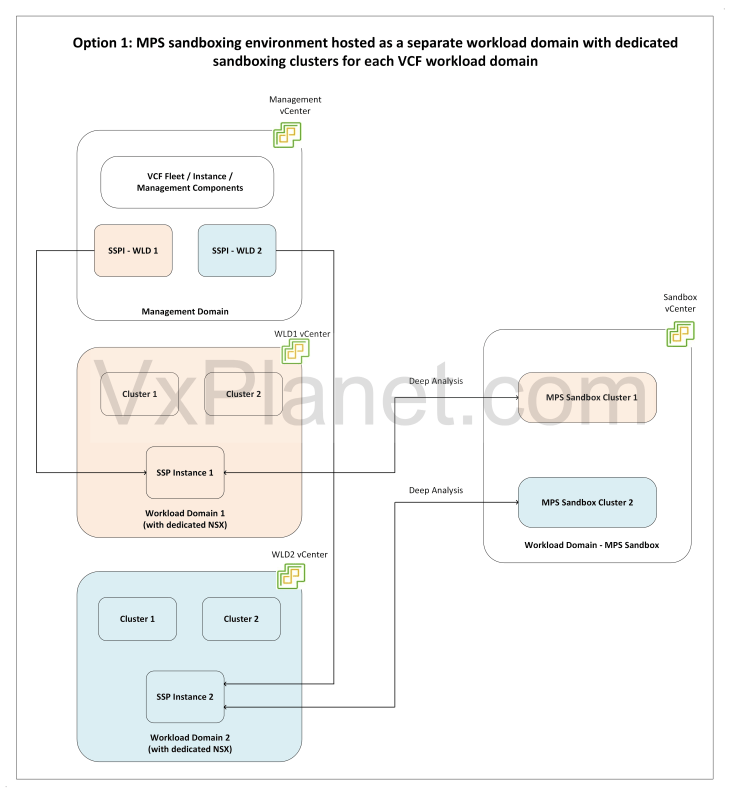
Option 1: MPS sandboxing environment hosted as a separate workload domain with dedicated sandboxing clusters for each VCF workload domain
In my opinion, this the recommended option as this ensures maximum isolation between the sandboxing environment and VCF workload domains. In this deployment option, sandboxing environment is hosted within it’s own workload domain providing a dedicated sandbox cluster for each VCF workload domain, as shown below:
MPS sandboxing environment co-located with SSP on the respective VCF workload domains
In this deployment option, the sandboxing environment is co-located with SSP and hosted on the respective VCF workload domain as a dedicated vSphere cluster as shown below:
MPS sandboxing environment co-located with SSP on the VCF management domain
In this deployment option, the sandboxing environment is co-located with SSP and hosted on the VCF management domain, with a dedicated sandbox cluster for each VCF workload domain as shown below:
This concludes our architectural overview, I hope you had a good read. We will pause for now and will meet in the next chapter and walkthrough the activation and deployment of Malware Prevention Service for VCF. Stay tuned!!!
I hope the article was informative. Thanks for reading.


