
Congratulations!!! If you are reading this, you are at the concluding chapter of the month-long blog series on vDefend Security Services Platform (SSP) and Security Segmentation. In the previous articles, we onboarded several applications to demonstrate various import procedures and use cases, and instantiated several DFW policy sets (less than 50 rules, I assume). Over the time, more applications begin to onboard at this fictitious customer, DFW rules grows (or sprawl) and managing a large number of rules can lead to policy deviations, inefficiencies and potential security gaps. Imagine an environment with 25k+ DFW rules, it’s practically complicated to assess it for rule duplicates, irrelevancies, contradictions, permissiveness etc.
SSP 5.1 introduced a DFW rule analysis engine that analyses the existing DFW rules for the below anomalies:
- Rule Duplication
- Rule Contradiction
- Rule Redundancy
- Rule Shadowing
- Rule Consolidation
- Rule Irrelevancy
- Rule Permissiveness
In this chapter, we will add a few manual rules to the existing application policies that will trigger the above anomaly conditions, activate and run the DFW rule analysis, review the result and confirm it matches with the expected output. Note that DFW Rule Analysis feature was already activated in Part 3.
Let’s get started:
Rule Duplication
Rule Duplication happens when two or more rules have the same configuration with the same action. Only the first rule will be evaluated and the remaining are skipped, however all these rules are still programmed in the data plane and will be present in the vnics of virtual machines. For the rules to be classified as duplicates, the below fields should match:
- Source
- Destination
- Services
- Context Profiles
- Applied-To
- Directionality, and
- Action
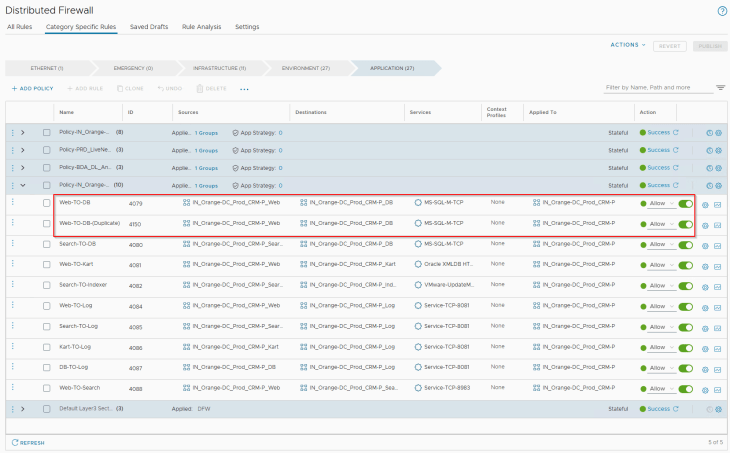
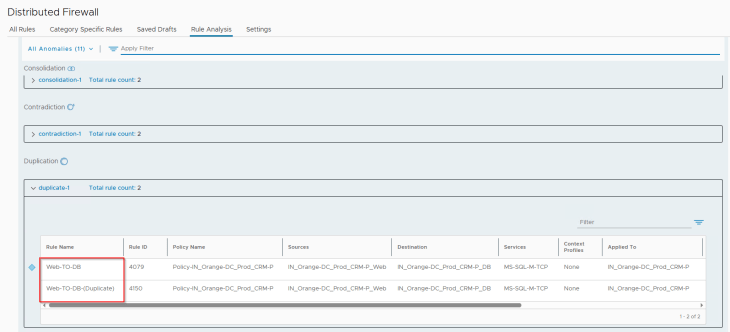
In order to trigger this anomaly in rule analysis, let’s add a duplicate rule (ID 4150) to the existing ruleset for the CRM Prod application, as highlighted:
Rule Contradiction
Rule Contradiction happens when two or more rules have the same configuration but with different actions. Only the first rule will be evaluated and the remaining are skipped, however all these rules are still programmed in the data plane and will be present in the vnics of virtual machines. For the rules to be classified as contradictory, the below fields should match:
- Source
- Destination
- Services
- Context Profiles
- Applied-To, and
- Directionality
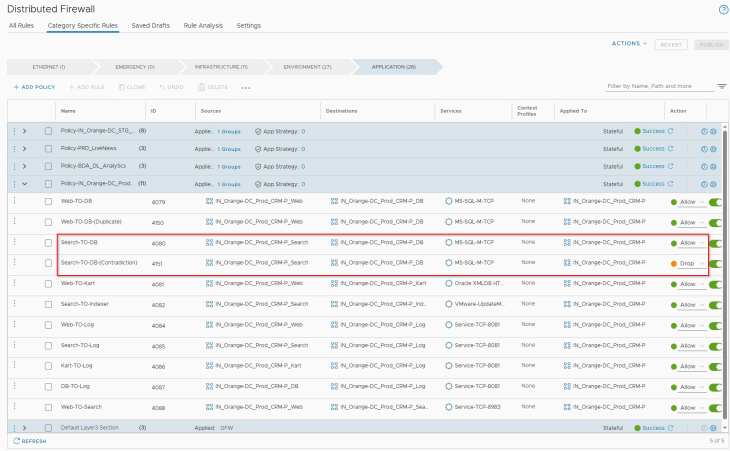
In order to trigger this anomaly in rule analysis, let’s add a contradictory rule (ID 4151) to the existing ruleset for the CRM Prod application, as highlighted:
Rule Redundancy
Rule Redundancy happens when there is a rule that supersedes one or more rules below it, where all the rules have the same action. Only the first rule will be evaluated and the remaining are skipped, however all these rules are still programmed in the data plane and will be present in the vnics of virtual machines. For a rule to supersede other rules, one or more of the below fields in the superseding rule should be a superset:
- Source
- Destination
- Services
- Context Profiles
- Applied-To
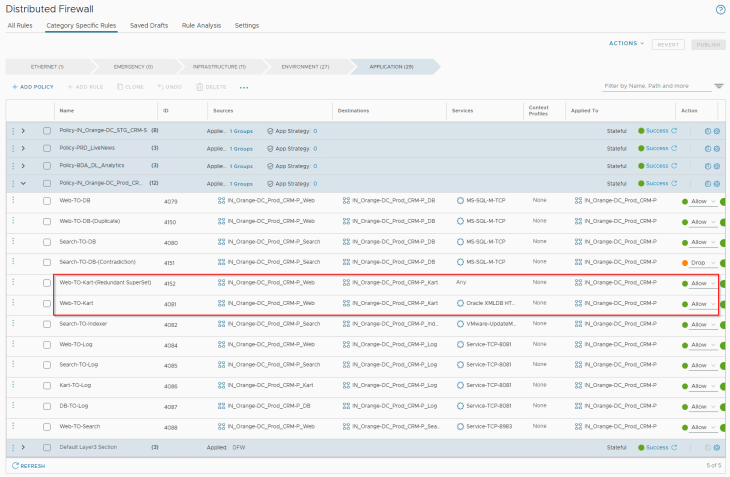
In order to trigger this anomaly in rule analysis, let’s add a superseding rule (ID 4152) to the existing ruleset for the CRM Prod application, as highlighted:
Rule Shadowing
Rule Shadowing happens when there is a rule that supersedes one or more rules below it, where the rules have different actions. Only the first rule will be evaluated and the remaining are skipped, however all these rules are still programmed in the data plane and will be present in the vnics of virtual machines. For a rule to shadow other rules, one or more of the below fields in the superseding rule should be a superset, but with a different action:
- Source
- Destination
- Services
- Context Profiles
- Applied-To
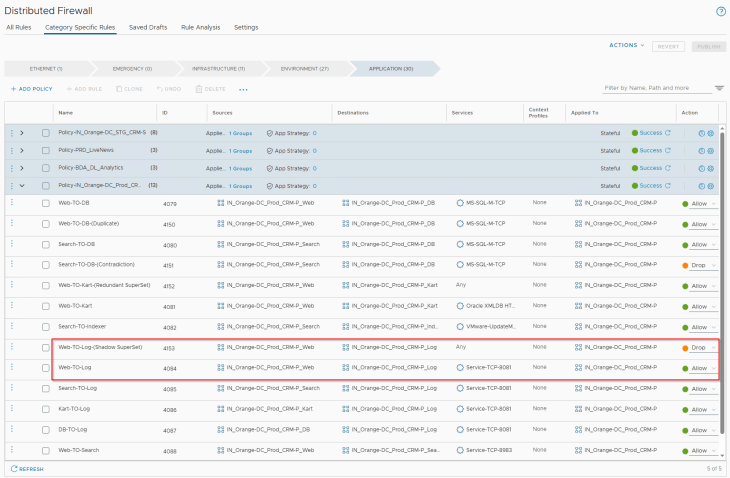
In order to trigger this anomaly in rule analysis, let’s add a shadow rule (ID 4153) to the existing ruleset for the CRM Prod application, as highlighted:
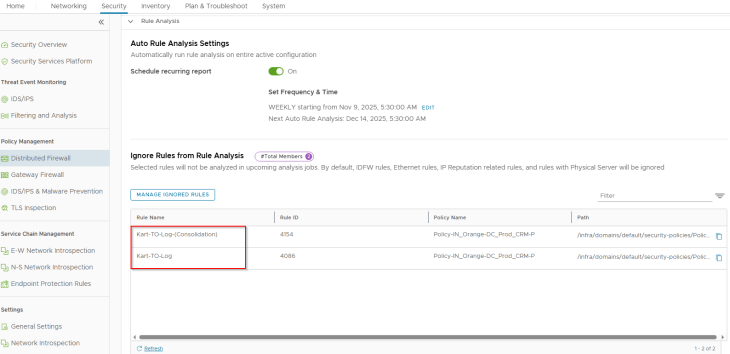
Rule Consolidation
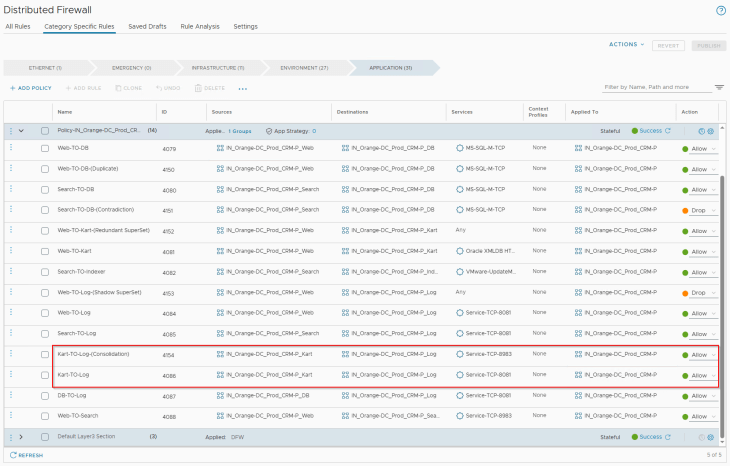
Rule Consolidation can be done when one or more rules have the same source, destination, applied-to and action fields, but differ in services and context-profile fields.
In order to trigger this in rule analysis, let’s add the below highlighted rule (ID 4154) to the existing ruleset for the CRM Prod application:
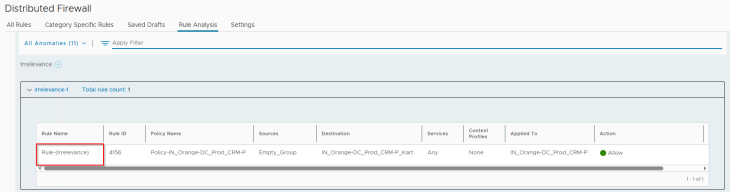
Rule Irrelevancy
Rule irrelevancy happens under the below scenarios:
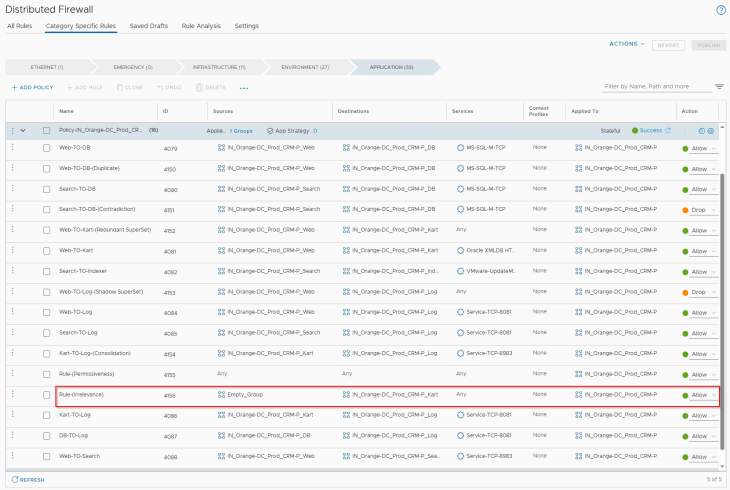
- Source, destination or applied-to field refers to a group that is empty.
- Applied-to field refers to a group that is IP-based
In order to trigger this in rule analysis, let’s add the below highlighted rule (ID 4156) to the existing ruleset for the CRM Prod application:
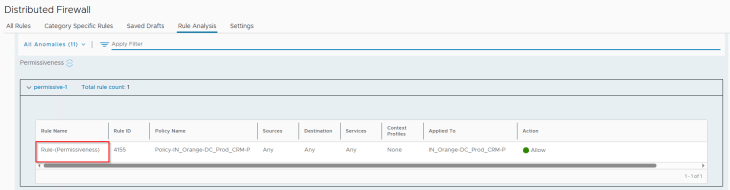
Rule Permissiveness
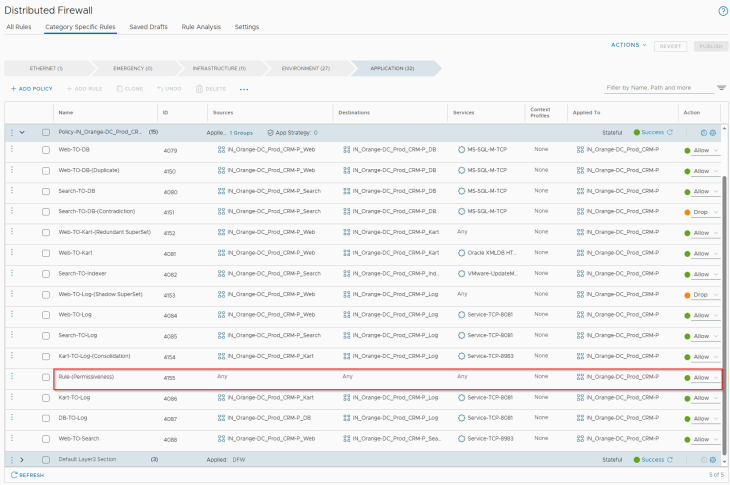
Rule permissiveness happens when source, destination, services, and context profiles are set to ANY and action is set to Allow. As part of application microsegmentation and lockdown, if we include a segmentation strategy with a default rule of Allow for monitoring purposes, this is still considered permissive unless it is locked down with an action of Drop / Reject.
In order to trigger this in rule analysis, let’s add the below highlighted rule (ID 4155) to the existing ruleset for the CRM Prod application:
Running the Rule Analysis
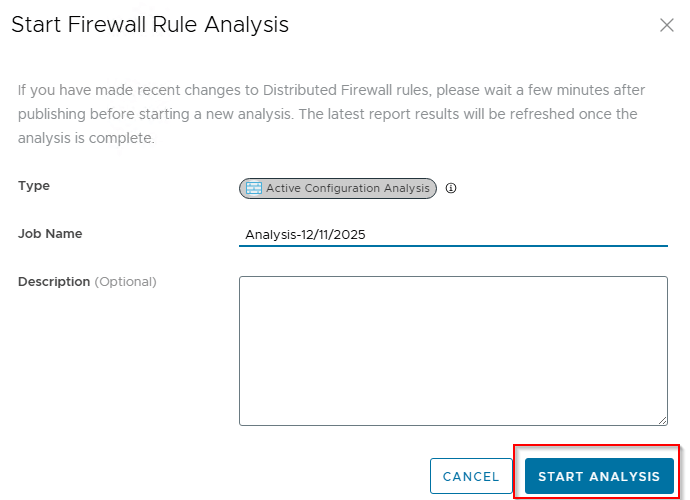
Now that we have all the triggering rules in place, let’s run the Rule Analysis and review if the result matches with our expectations:
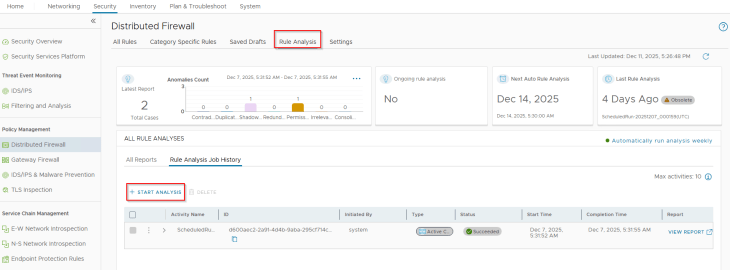
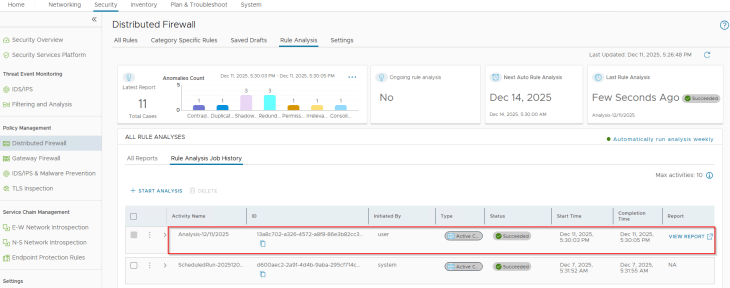
Rule analysis has succeeded and we see action items against each anomaly category:
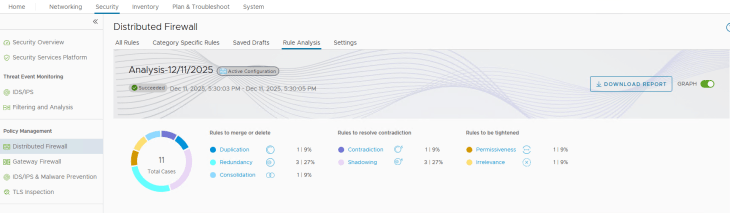
Reviewing the Rule Analysis Result
For the rule duplicates anomaly, we see that our triggering rule 4150 has been successfully flagged:
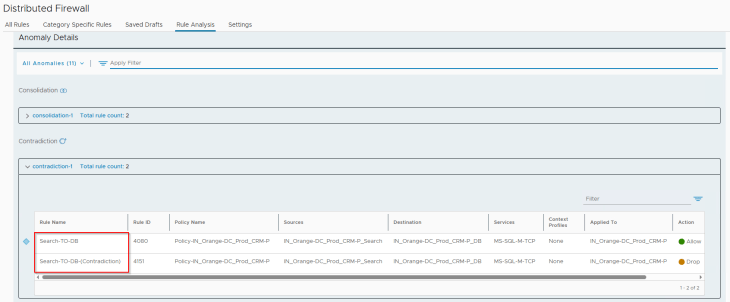
For the rule contradictions anomaly, we see that our triggering rule 4151 has been successfully flagged:
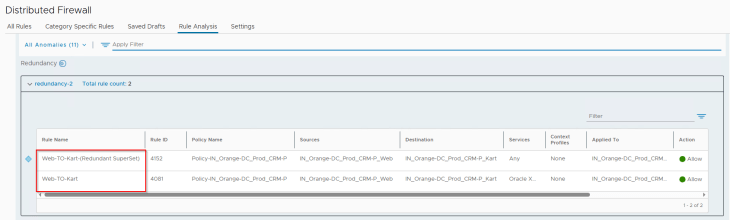
For the rule redundancy anomaly, we see that our triggering rule 4152 has been successfully flagged:
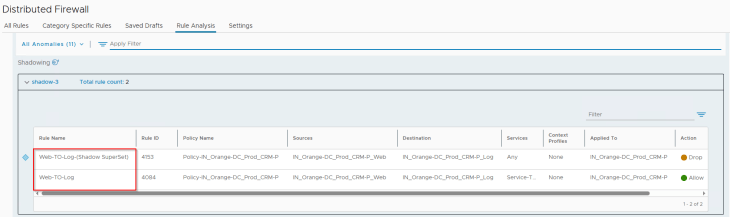
For the rule shadowing anomaly, we see that our triggering rule 4153 has been successfully flagged:
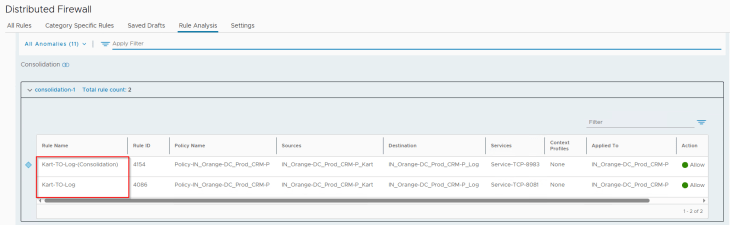
For rule consolidation, we see that our triggering rule 4154 has been successfully flagged:
For the rule irrelevance anomaly, we see that our triggering rule 4156 has been successfully flagged:
And finally, for rule permissiveness we see that our triggering rule 4155 has been successfully flagged:
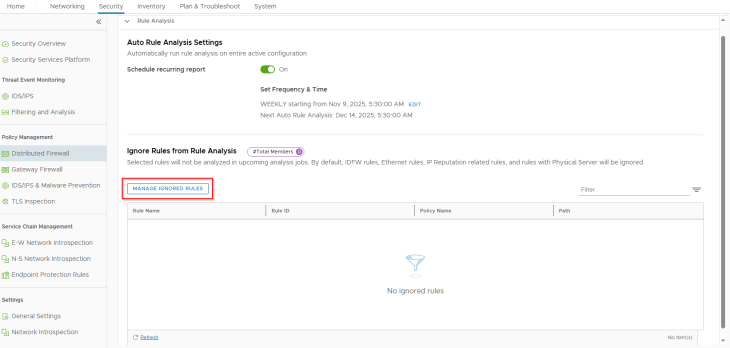
Adding Rule Analysis Exceptions
If there are some rules that were triggered during rule analysis, and we believe those are intentional, we could add them to the exception list. These rules will not be triggered again in the next analysis.
For example, I added the consolidation rules to the list as I wanted them as two separate rules for logging purposes, they won’t be triggered again.
Scheduling Rule Analysis
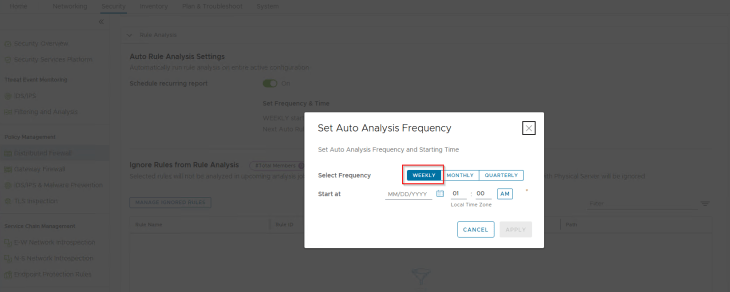
Rule Analysis can also be scheduled to run at intervals, a frequency of weekly is an ideal option.
Congratulations, we have done it!!! We are now concluding our series. If you are still reading, Thank you so much for your time reading my content, I hope this series gave you deeper insights on the new vDefend SSP 5.1 and DFW 1-2-3-4 methodology based Security Segmentation Journey.
See you later with a new VCF / NSX topic. You can also say Hi and offer me a drink, button below:

Continue Reading? Here are the other parts of this series:
Part 1: Introduction
https://vxplanet.com/2025/12/18/vdefend-security-services-platform-and-security-segmentation-part-1-introduction/
Part 2: Platform Deployment
https://vxplanet.com/2025/12/19/vdefend-security-services-platform-and-security-segmentation-part-2-platform-deployment/
Part 3: NSX Onboarding and Feature Activation
https://vxplanet.com/2025/12/19/vdefend-security-services-platform-and-security-segmentation-part-3-nsx-onboarding-and-feature-activation/
Part 4: Application Hierarchy Import
https://vxplanet.com/2025/12/22/vdefend-security-services-platform-and-security-segmentation-part-4-application-hierarchy-import/
Part 5: Publishing Assets and Policies
https://vxplanet.com/2025/12/22/vdefend-security-services-platform-and-security-segmentation-part-5-publishing-assets-and-policies/
Part 6: Segmentation Monitoring and Policy Recommendations
https://vxplanet.com/2025/12/23/vdefend-security-services-platform-and-security-segmentation-part-6-segmentation-monitoring-and-policy-recommendations/
Part 7: Partial Hierarchy and Incremental Import
https://vxplanet.com/2026/01/08/vdefend-security-services-platform-and-security-segmentation-part-7-partial-hierarchy-and-incremental-import/
Part 8: Promoting NSX Groups
https://vxplanet.com/2026/01/10/vdefend-security-services-platform-and-security-segmentation-part-8-promoting-nsx-groups/
Part 9: Handling App Scaling
https://vxplanet.com/2026/01/10/vdefend-security-services-platform-and-security-segmentation-part-9-handling-app-scaleout/
Part 10: Handling App Transitions
https://vxplanet.com/2026/01/11/vdefend-security-services-platform-and-security-segmentation-part-10-handling-app-transitions/


