
NSX Application Platform (NAPP) and the automation appliance (NAPP-AA) is scheduled to be end of life by May 2026. If you recollect, we did a couple of blog series around NAPP and NAPP-AA previously, please check out if you are still interested:
NAPP series: https://vxplanet.com/2023/05/03/nsx-4-1-application-platform-napp-part-1/
NAPP-AA series: https://vxplanet.com/2024/04/16/nsx-application-platform-automation-appliance-napp-aa-part-1-topology-and-appliance-deployment/
Now the question is, what is the alternative and / or switchover options from NAPP? Starting NSX 4.2, we have a new scalable, self-contained Kubernetes platform that runs vDefend security services, including Security Intelligence, Malware Prevention, Network Traffic Analysis & Network Detection and Response (the latest version offering Baremetal security and DFW rule analysis). This platform is called VMware vDefend Security Services Platform (or just SSP). SSP is delivered as a standalone component (decoupled from NSX manager) with separate UI access for vDefend services and lifecycle management.
SSP 5.0 was launched earlier this year (March 2025) as a successor of NAPP, with main enhancements around the underlying microservices platform and introduction of segmentation score report. Similar to NAPP, SSP 5.0 generated policy recommendations and policy automation against the application category in DFW. Shared infrastructure services protection and environment / zone segmentation use cases were still a manual work outside of SSP.
With the release of SSP 5.1 (Oct 2025), we now have a guided and prescriptive workflow to get the necessary DFW rules of applications across DFW categories in a phased approach, often called DFW 1-2-3-4 approach.
- Phase 1 starts with performing a segmentation (security) assessment, understanding the current segmentation score / posture and reviewing the segmentation report with recommendations.
- Phase 2 starts with securing traffic to shared infrastructure services
- Phase 3 secures traffic between environments or zones with exceptions for inter-zone communications
- Phase 4 secures the applications either via application ring fencing or application microsegmentation.
This is all achieved through a data-driven CMDB import process, simplifying the policy formulation and lockdown process from months to just weeks or even days.
In this 11-part blog series on Security Services Platform and Security Segmentation, we will do a comprehensive deep-dive on the platform architecture & deployment, CMDB import and policy formulation with different hierarchies, application scaling & transitions and the newly introduced DFW rule analysis capabilities. Here is the breakdown:
Part 1: Introduction
Part 2: Platform Deployment
Part 3: Onboarding and Feature Activation
Part 4: Full Hierarchy Import
Part 5: Publishing Assets and Policies
Part 6: Segmentation Monitoring
Part 7: Partial Hierarchy Import
Part 8: Promoting Existing NSX groups
Part 9: Handling App Scaling
Part 10: Handling App Transitions
Part 11: DFW Rule Analysis
Let’s get started:
NSX Application Platform vs vDefend Security Services Platform
Below is a comparison table between NSX Application Platform and vDefend Security Services Platform. There is a transition plan / checklist available on Broadcom Techdocs to assist with migrating from NAPP to SSP. Please note that, this is a non-reversible process. Once an NSX manager is onboarded to SSP, NAPP cannot be enabled on the same NSX instance at a later stage, even after the NSX instance is offboarded from SSP.
https://techdocs.broadcom.com/us/en/vmware-security-load-balancing/vdefend/vmware-nsx-application-platform/4-2/switchover-guide–nsx-application-platform-to-security-services-platform/migration-tasks.html
| NSX Application Platform | vDefend Security Services Platform |
| Scheduled for deprecation by May 2026 | Successor of NAPP. Recommended platform for vDefend security services |
| Deployed via NAPP-AA on vSphere supervisor (VKS as the underlying Kubernetes platform) | Deployed via SSP Installer with a self-contained vanilla Kubernetes cluster |
| Requires a VKS license | No additional license requirements |
| Flexibility to DIY using vanilla Kubernetes clusters instead of NAPP-AA | Deployed via SSP Installer with a self-contained vanilla Kubernetes cluster. No out of the box K8S clusters supported |
| Flexibility to use either HAProxy or AVI Load balancer to support Kubernetes load balancer services when deployed with a DIY approach | MetalLB is used as the load balancer in the SSP instance |
| Air-gapped deployments required manual additional steps (like setting up a local Harbor registry) | Fully supports air-gapped deployments |
| No backup / restore capabilities | Backup and restore capabilities available |
| Lifecycle management performed from NSX manager | Lifecycle management for SSP is decoupled from NSX manager and is handled by a separate LCM appliance |
| Recommended deployment requires three networks – Management, Workload and VIP | Recommended deployment can be done with a single flat network. |
| No support for VCF 9.0 and above | Only option on VCF 9.0 and above |
| Can be transitioned to SSP | Cannot be transitioned back to NAPP. NAPP is transitioned to SSP through a non-reversible process. |
SSP Requirements
The below are the requirements for deploying vDefend Security Services Platform. All the requirements need to be met for a successful deployment of the platform.
- Interoperability requirements: SSP requires NSX version 4.2 and higher + vSphere version 8.0u3 and higher.The below KB lists some known interoperability issues between SSP and NSX versions. It’s recommended to be on NSX 4.2.3 or higher.
https://knowledge.broadcom.com/external/article/414369
- License requirements: SSP doesn’t require a license for deployment. However, for feature activations, the NSX manager that is onboarded to SSP need to be licensed with a vDefend add-on license for ATP.
- Sizing requirements: The below table summarizes the sizing requirements for SSP with different worker node scale values:
| Controller Node Count | Worker Node Count | Total CPU (GHz) | Total Memory (GB) | Total Recommended Storage (GB) |
| 3 | 4 | 92 | 344 | 4700 |
| 3 | 5 | 108 | 408 | 4900 |
| 3 | 6 | 124 | 472 | 5100 |
| 3 | 7 | 140 | 536 | 5300 |
| 3 | 8 | 156 | 600 | 5500 |
| 3 | 9 | 172 | 664 | 5700 |
| 3 | 10 | 188 | 728 | 5900 |
- Network requirements: Depending on the network topology (to be discussed in next section), up to two networks might be required. The networks can be VLAN based (preferred) or NSX overlay based. The latency between the networks should be 10ms or lesser.
- SSPI network: This can be the same as management network
- SSP network: This can be either from the management network or from a new network dedicated for the SSP instance. A /27 subnet should be sufficient for a full scale deployment of 10 worker nodes.
- DNS requirements: Three DNS host records are required and should be pre-created before the platform deployment:
- DNS record for the SSP Installer appliance
- DNS record for the SSP instance
- DNS record for the SSP messaging FQDN
- Firewall requirements: Necessary firewall ports documented in Broadcom Ports and Protocols need to be enabled depending on the features that are planned to be activated. For example, if Malware Prevention Services are planned to be enabled, SSP node network would require access to the Lastline cloud services.
https://ports.broadcom.com/home/VMware-vDefend
- vSphere requirements: The vSphere cluster must have DRS enabled. It’s not recommended to disable DRS on the vSphere cluster where SSP is deployed.
Security Services Platform Components
The key components of Security Services Platform include the SSP Installer, SSP Instance and core services:
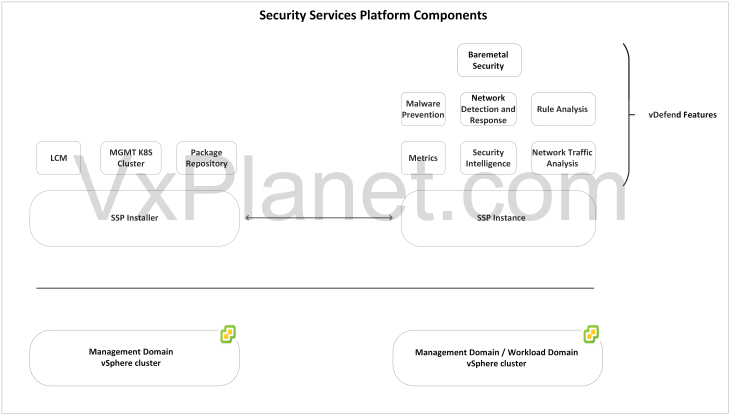
SSP Installer: SSP Installer is the life-cycle management component that is delivered as an ova appliance. SSP installer deploys the SSP Instance. Currently an SSP Installer manages a single SSP Instance. Even though the component name says “Installer”, it does beyond just SSP instance deployment. SSP Installer runs a management kubernetes cluster that bootstraps the SSP instance (workload cluster), performs machine health checks against the deployed SSP instance, runs a local harbor registry and has the cli tools needed to manage the SSP instance. With that being said, SSP Installer should not be powered off or decommissioned after the SSP instance is deployed.
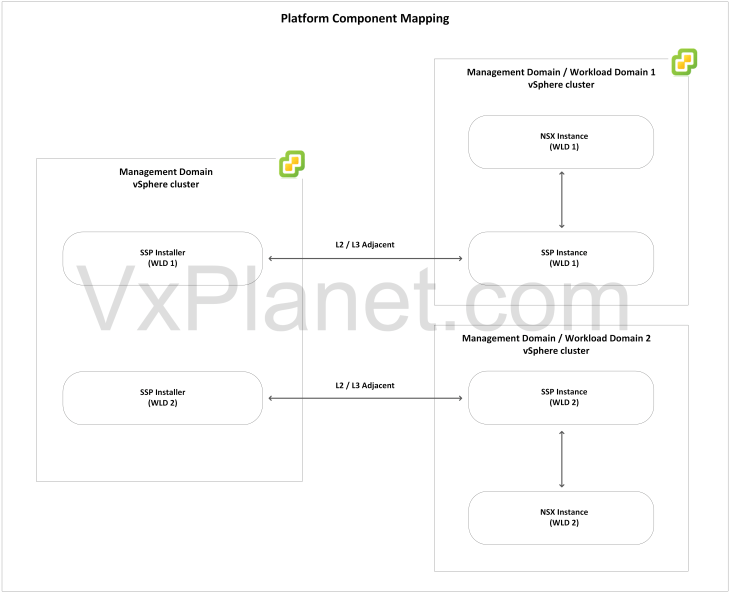
SSP Instance: An SSP instance is a self-contained kubernetes workload cluster that hosts the SSP core components. An SSP instance is managed by it’s respective SSP Installer and is integrated with a single NSX instance. If we have multiple VCF workload domains each with a separate NSX instance, we will require once SSP Installer and one SSP instance for each NSX manager cluster. At full scale, an SSP instance supports up to 10 worker nodes. It’s recommended to use the SSP sizer tool to plan the number of worker nodes required before deploying the SSP instance. Instructions to download and using the tool is available in the below KB:
https://knowledge.broadcom.com/external/article?articleNumber=388027
Core Services: Core services are the platform components that are deployed in the SSP instance as microservices. They include messaging services, metrics, analytics, database, event storage etc. Depending on the flow ingestion rate to the platform, the core services can be scaled out to additional SSP worker nodes as required. Please note that scale out operation is a non-reversible process, you cannot scale-in back later.
The below sketch shows the mapping between an SSP Installer, SSP instance and NSX manager.
SSP Deployment Topologies
1. Network Topologies
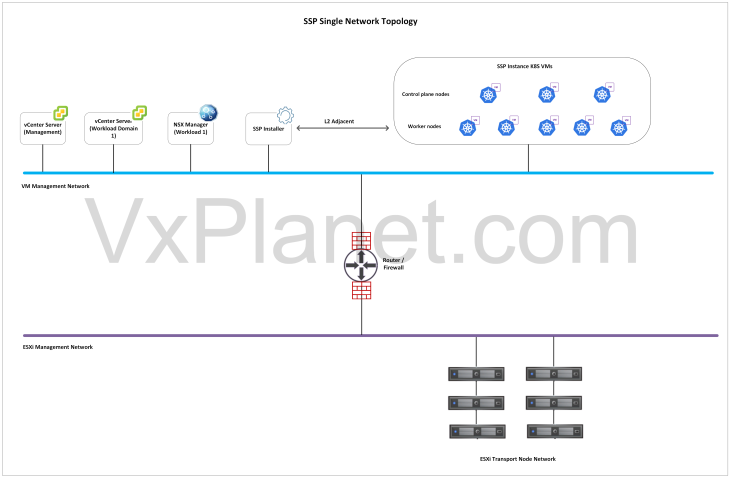
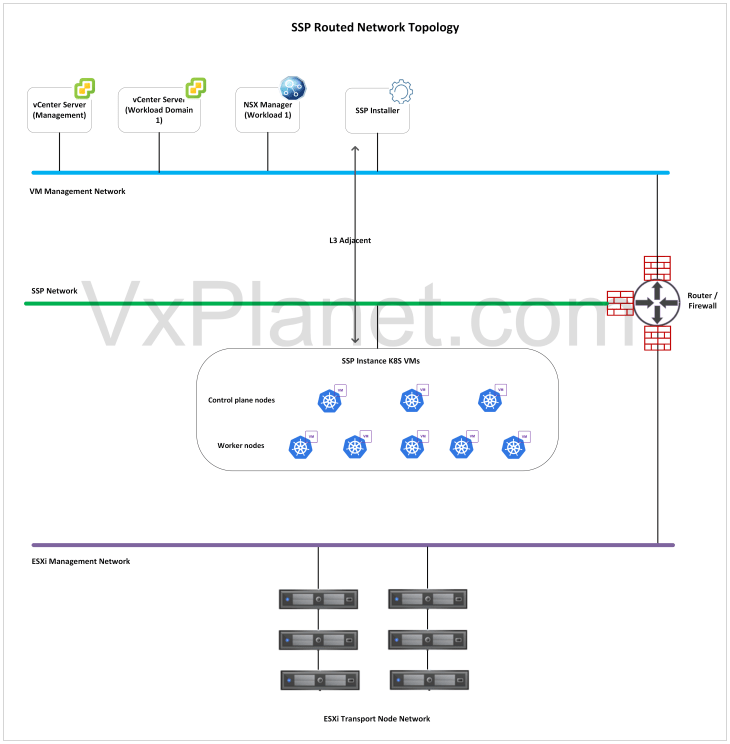
SSP components can be deployed either in a single flat network (L2) or across two different networks that are routed to each other (L3). The choice of network topology depends on the availability of IP addresses, workload domain / cluster where SSP is getting deployed and the level of isolation required for the components.
Single Network Topology: In this topology, both SSP Installer and SSP Instance will be deployed on a single network (VLAN backed or NSX overlay). Ideally this network will be the management network that has L2 adjacency with the other VCF management components like vCenter, NSX etc. If this network is separate from the management network, the necessary firewall ports between the components as described in the requirements section needs to be enabled.
Routed Network Topology: In this topology, the SSP Installer will be deployed in the VCF management network, adjacent to vCenter and NSX however, the SSP instance will be deployed on a separate network that is L3 routable to the management network.
2. Workload domain topologies
In a VCF environment with multiple workload domains each managed by separate NSX instances, we have the below placement options available:
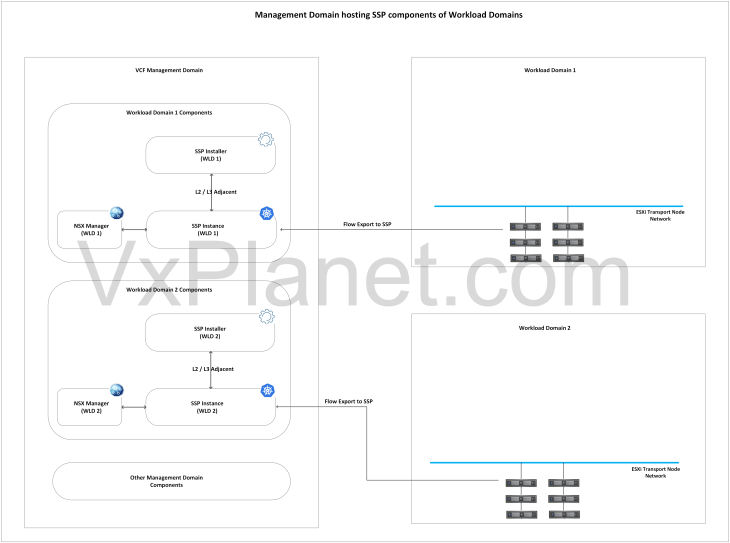
All SSP components on the management domain: In this deployment option, all the SSP components of the workload domains will be hosted on the vSphere cluster of the management domain. In most cases, the deployment will leverage single network topology unless a level of network isolation is required between the SSP instances. The management domain has to be sized appropriately to host the SSP instances and also the management vSphere cluster resources need to scale as and when VCF scales out to additional workload domains.
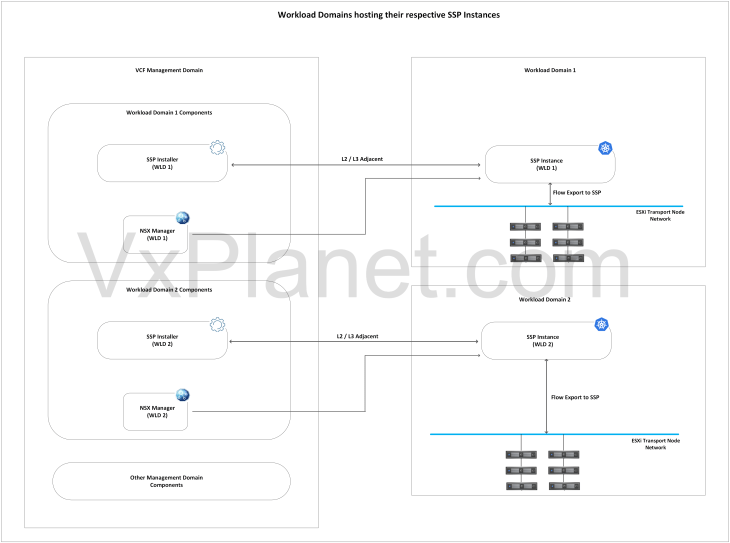
SSP Instances co-located with the workload domain: In this deployment option, the SSP Installers of the workload domains will be hosted on the management domain, whereas the SSP instances will be hosted on their respective workload domains. As VCF scales out to additional workload domains, SSP instances can scale out linearly along with the workload domains without constraints to the management domain sizing. This option is preferred when management domain has sizing constraints to host the SSP instances.
Security Segmentation Planning
Segmentation planning is one of the key enhancements introduced with Security Intelligence in SSP 5.1, that maps datacenter / application structures as hierarchies and assets in SSP. Basically this is a data-driven CMDB import process (via a csv file) that helps to define datacenter / application hierarchies using scopes (Region, Zone, Environment, Application and Application Tiers). SSP understands the hierarchy and maps them as special groups called inventory assets, that is used for zone segmentation and application microsegmentation.
The below sketch shows a datacenter hierarchy that will be mapped as inventory assets in SSP. This is a sample topology I have built in the lab that will be used to explain the hierarchy import process starting from Part 4.
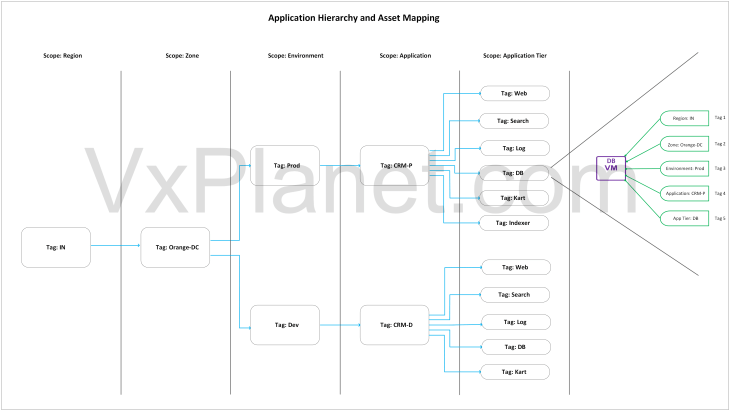
Each element in the hierarchy has a corresponding scope defined in SSP, and each scope covers all the workloads at it’s level and subordinate workloads beneath it. For example, we have a top-level scope called ‘region’ with a tag value called ‘IN’. Beneath the region scope, we have a subordinate scope called ‘zone’ with a tag value of ‘Orange-DC’. Below the zone hierarchy, we have ‘Environment’ scope with two tag values ‘Prod’ and ‘Dev’. Each environment scope has an subordinate ‘application’ scope with tags ‘CRM-P’ and ‘CRM-D’, followed by subordinate scopes that defines the application tiers. The hierarchy has a maximum depth of 5, or simply 5 scopes. That means, a VM included in the csv full hierarchy import process is going to get 5 tags denoting the Region, Zone, Environment, Application and Application Tier.
The workflow also supports importing flexible partial hierarchies using fewer scopes, for example, in scenarios where an application spans across multiple zones. Let’s say, if only Environment, Application, and Application Tier in the hierarchy are needed, we could exclude the Region and Zone fields as part of CMDB import. We will discuss more on this topic from Part 4 onwards.
Stay tuned!!!, we have a lot to cover, and this series is going to keep you and me busy for the next 30 days. We will meet in Part 2 soon to start the deployment session of SSP.
I hope the article was informative.
Thanks for reading.


