Welcome back and New Year Wishes to all the readers!!! We are at Part 7 of the blog series on vDefend Security Services Platform and Security Segmentation. In the previous three chapters, we discussed the full hierarchy import procedure (5 hierarchy levels) of the Prod and Dev CRM applications and completed the segmentation journey by configuring the necessary flow-based exceptions & microsegmentation rules and lock down of the shared infrastructure services, environmental and application policies. In this chapter, we will introduce a new Analytics application to our lab that spans across two zones and demonstrate an incremental partial hierarchy import that builds on top of the already existing hierarchy that we imported. If you missed the previous chapters where we covered the full hierarchy import, please check out from the links below:
Part 4: Application Hierarchy Import
https://vxplanet.com/2025/12/22/vdefend-security-services-platform-and-security-segmentation-part-4-application-hierarchy-import/
Part 5: Publishing Assets and Policies
https://vxplanet.com/2025/12/22/vdefend-security-services-platform-and-security-segmentation-part-5-publishing-assets-and-policies/
Part 6: Segmentation Monitoring and Policy Recommendations
https://vxplanet.com/2025/12/23/vdefend-security-services-platform-and-security-segmentation-part-6-segmentation-monitoring-and-policy-recommendations/
Let’s get started:
Application Description and Hierarchy
To demonstrate a partial hierarchy import, I have deployed a new Analytics application called DL_Analytics in a new environment called BDA that spans across two zones –> Orange-DC and Green-DC. These two zones host both independent and spanned applications and are also DR sites to each other, and the zones are not a security boundary.
The DL_Analytics application has two tiers:
- Ingestion Tier: Connects to the CRM Prod and CRM Dev applications (that we deployed in the previous chapters), fetches the database information and feeds to the Analytics tier
- Analytics Tier: Spans across the two zones with VMs in Orange-DC as Active and VMs in Green-DC as Standby (asynchronous replication), and receives the data from Ingestion tier for data analytics.
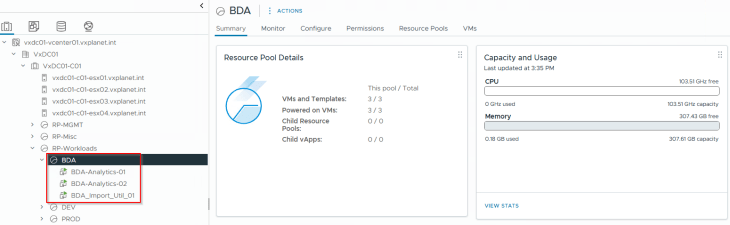
The below table shows the application details, including the tiers, VMs and zones that the application spans to.

The below sketch shows the application interdependency map. Note that there is an inter-environment communication from the BDA Ingestion Tier (in the BDA environment) to the CRM-Prod DB Tier (in the Prod environment) and the CRM-Dev DB Tier (in the Dev environment).
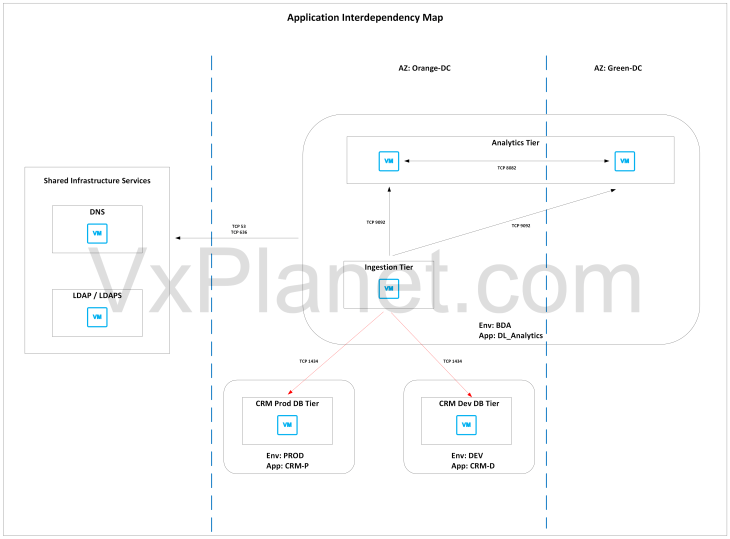
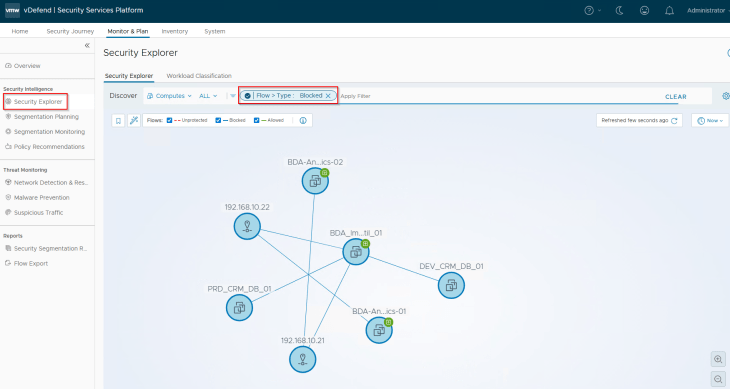
Since we have already locked down the CRM-Prod and CRM-Dev applications in the previous chapter, we should see both unprotected and blocked flows in Security Intelligence. The blocked flows are related to the BDA Ingestion Tier communicating to the CRM-Prod DB Tier and CRM-Dev DB Tier
Importing the Partial Hierarchy
If we prepare the csv metadata with full hierarchy information (like in Part 4), this is what happens:
- The DL_Analytics application will be treated as two separate SSP Application assets based on the hierarchy formulation.
- SSP Application 1 will be named as IN_Orange_DC_BDA_DL_Analytics with BDA_Import_Util_01 and BDA_Analytics_01 as members
- SSP Application 2 will be named as IN_Green_DC_BDA_DL_Analytics with BDA_Analytics_02 as member
Since the two zones Orange-DC and Green-DC are not a security boundary, we need to treat this as one single SSP application, and this is achieved via a partial hierarchy import.
As stated in the previous chapters, hierarchy columns in the csv metadata are flexible. Let’s build a new csv metadata file with a partial hierarchy, skipping the region and zone fields and with only environment, application and application tier fields included.

Now if we translate the csv metadata to an application hierarchy diagram, it looks like the below:
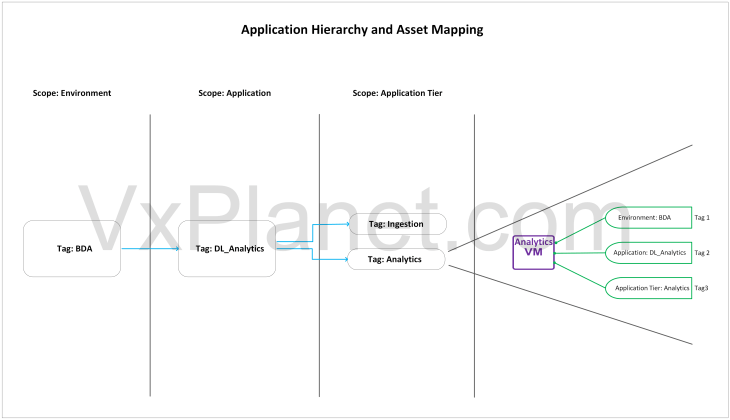
Each application VM in the csv input spec will receive three tags – one for environment scope, another for application scope and the other for application tier scope. SSP inventory assets and NSX security groups are created based on dynamic tag-based criteria that maps to environments, applications and application tiers.
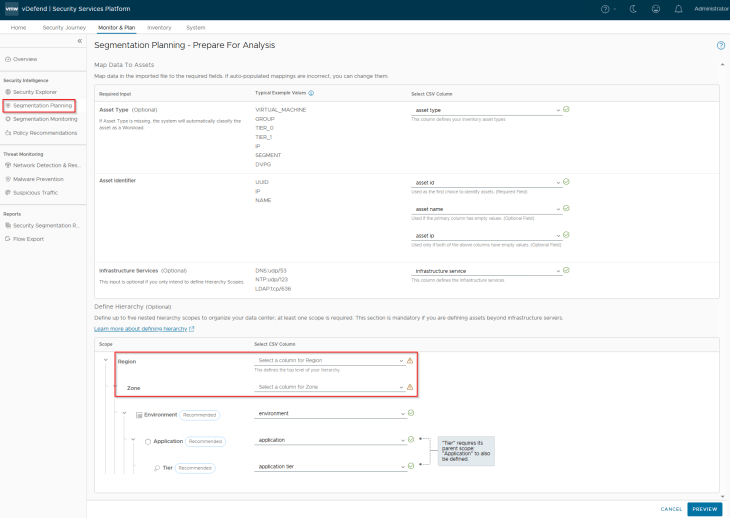
We will now import the csv and map the column headers in the imported csv to the respective fields. Note that we haven’t included Region and Zone columns in the csv file, hence these fields can be left blank while mapping.
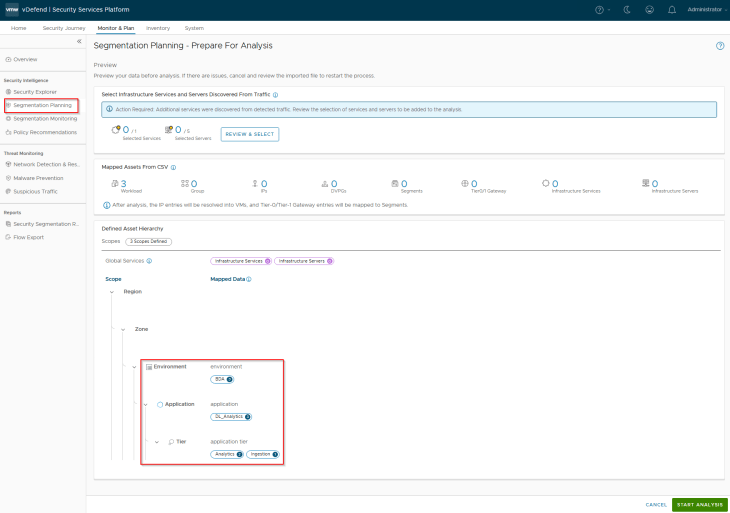
This is a preview of the assets and hierarchy that are mapped from the csv. Notice the three scopes and the different tags that will be applied to the VMs included in the csv.
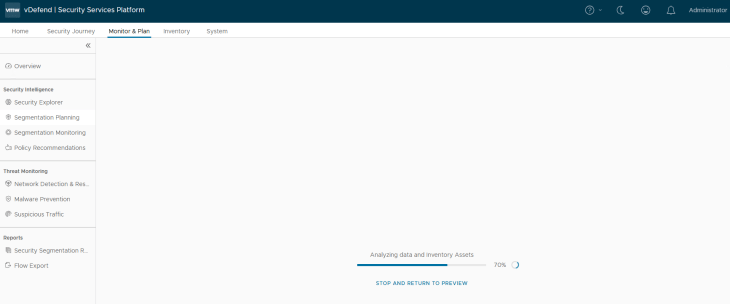
Let’s run the analysis, this might take some time depending on how large the import metadata is.
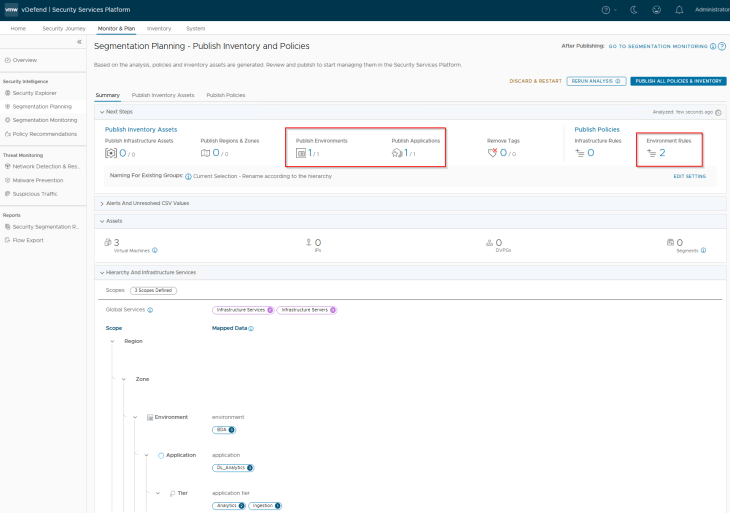
Okay, the analysis is now complete. Based on the hierarchy, we have the below assets and rules recommended for publishing:
- 1 Environment (BDA)
- 1 Application (DL_Analytics)
- 2 Application tiers (Ingestion and Analytics)
- 2 Environment rules (for the Environment category in DFW)
Reviewing Inventory Assets and Policies
Let’s review the assets and recommended policies / rules:
Since we excluded the Region and Zone scopes during the import process (Partial Hierarchy import), we will only have the Environment, Application and Application Tier assets recommended for publishing.
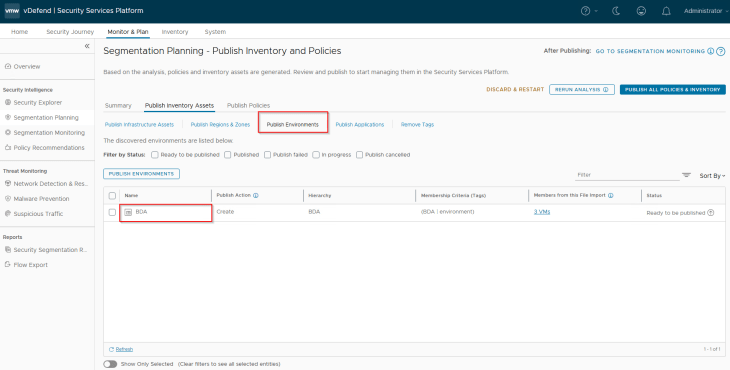
Below is the Environment asset recommended for publishing. This will be mapped as a dynamic tag-based security group in NSX manager.
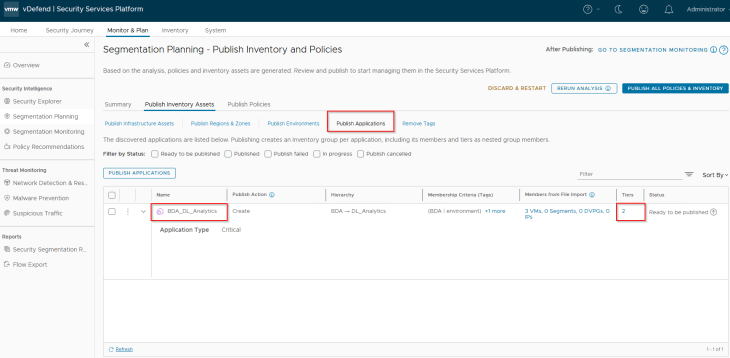
Below is the Application asset recommended for publishing. This will be mapped as a dynamic tag-based security group in NSX manager. As discussed earlier, application assets can be of type Regular or Critical depending on how the flow prioritization need to be done. We have marked this application as Critical.
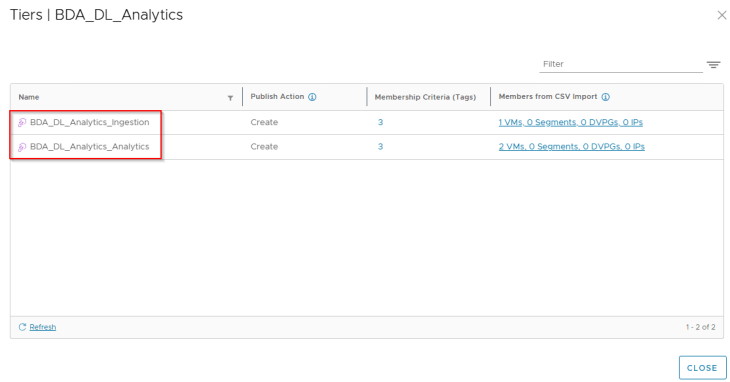
Below are the Application Tier assets recommended for publishing. These will be mapped as dynamic tag-based security groups in NSX manager.
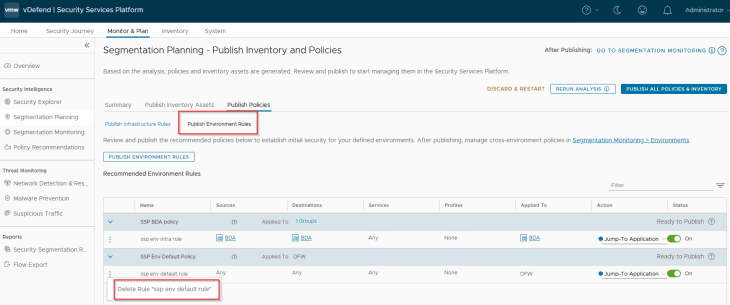
There are no Infrastructure policies / rules recommended as we haven’t included them. Below are the Environment rules that are recommended for publishing. The rules are for BDA Intra-environment access with an action of ‘Jump to Application’ to facilitate microsegmentation rules under the Application category. Inter-environment exceptions and lockdown rules will be implemented towards the end of this article, as part of segmentation monitoring.
We already have the default environment category rule published in the previous chapter, hence we will delete this recommendation.
Publishing Assets and Policies
Now that we reviewed the recommended inventory assets and policies, let’s publish those.
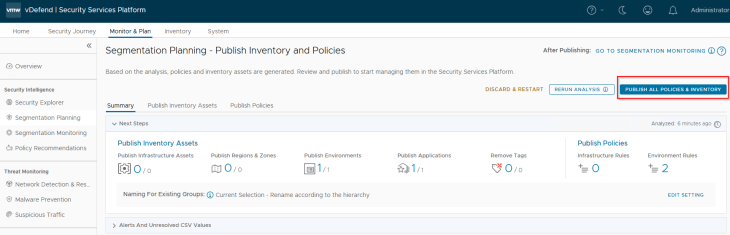
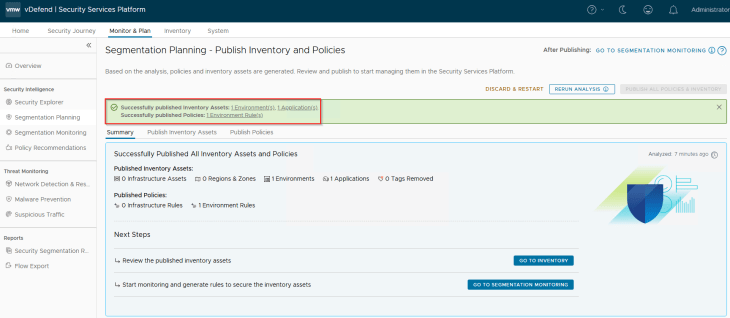
We now have new environment and application inventory assets created in SSP. Note that there is no creation or refresh of Region and Zone inventory assets, as they were not defined in the import process (Partial Hierarchy Import).
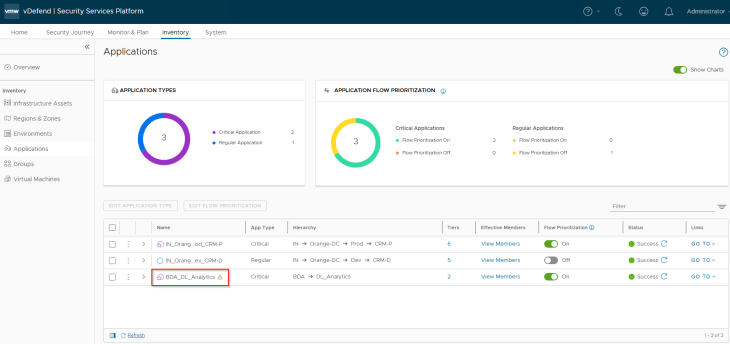
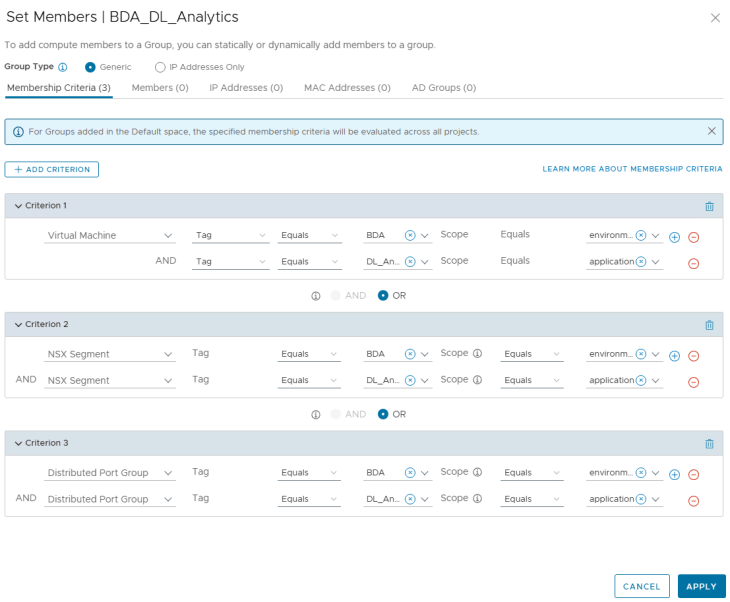
As discussed previously, these inventory assets map as dynamic tag-based security groups in NSX Manager. Below is the NSX security group for the Application asset.
Inter-Environment Exceptions and Environment Lockdown
Since we have a new environment onboarded (called BDA), Security Intelligence creates 4 new environment pairs based on the direction of traffic with the existing environments – Prod and Dev
- BDA to Prod
- Prod to BDA
- BDA to Dev
- Dev to BDA
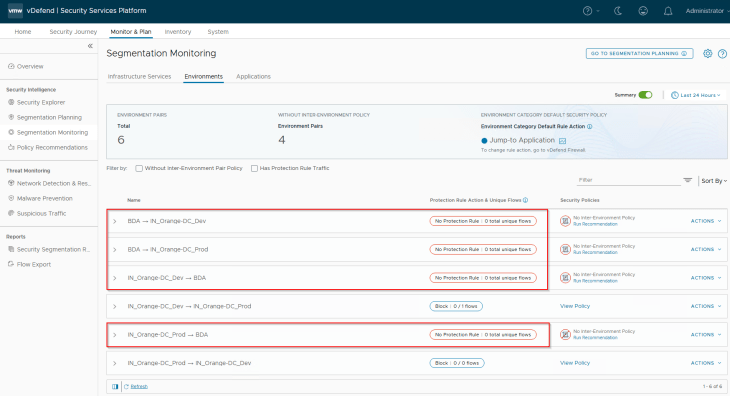
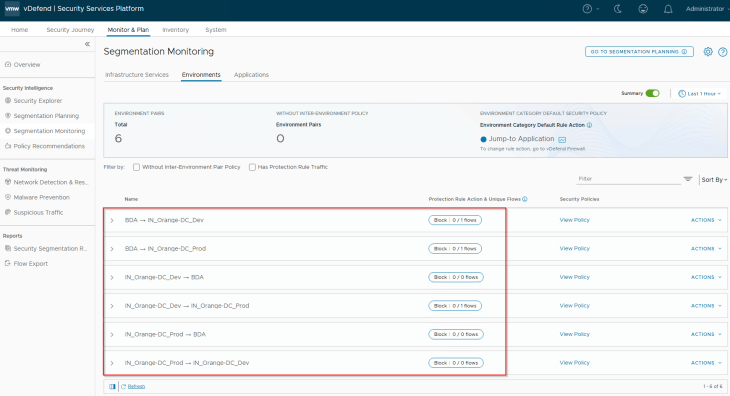
Similar to how we did in Part 6, we will review the inter-environmental traffic flows, create exception rules, and add inter-environmental protection rule with an action of Drop. We do the protection rule action as Drop because we are already aware that there are no inter-environmental flows except the BDA Ingestion Tier (in the BDA environment) communicating with the CRM-Prod DB Tier (in the Prod environment) and the CRM-Dev DB Tier (in the Dev environment). In a typical production environment, we start with an action of ‘Jump to Application’, monitor the protection rule periodically, add incremental rules, and eventually change to action to Drop / Reject if there is nothing else to exempt. This could take weeks depending on the scale, necessary reviews and approvals.
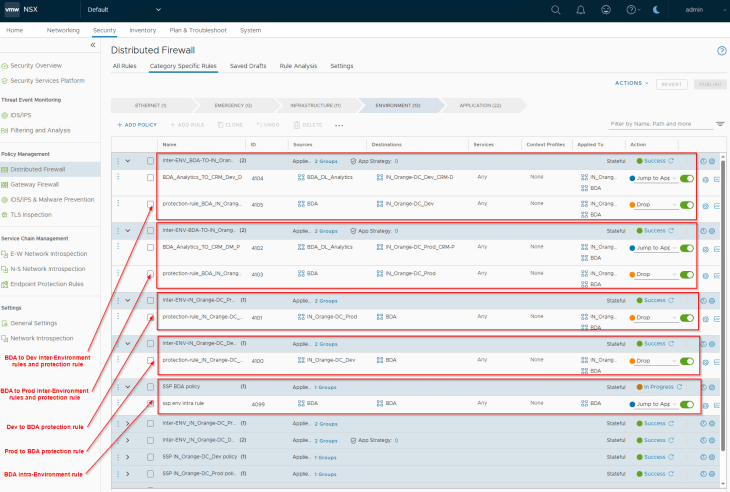
The below inter-environment policies are now published to NSX Manager
- BDA to Dev: Exception rules + Protection rule
- BDA to Prod: Exception rules + Protection rule
- Dev to BDA: Protection rule only
- Prod to BDA: Protection rule only
Microsegmentation and Lockdown of Analytics Application
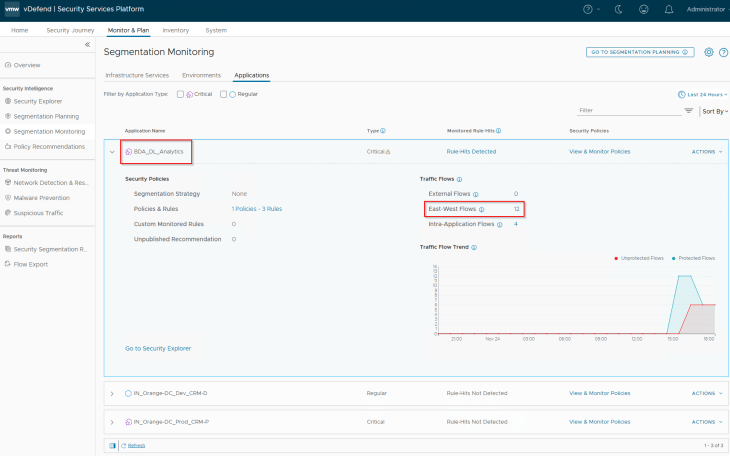
Let’s navigate to Monitor & Plan -> Segmentation Monitoring -> Applications and review the flows for BDA_DL_Analytics application
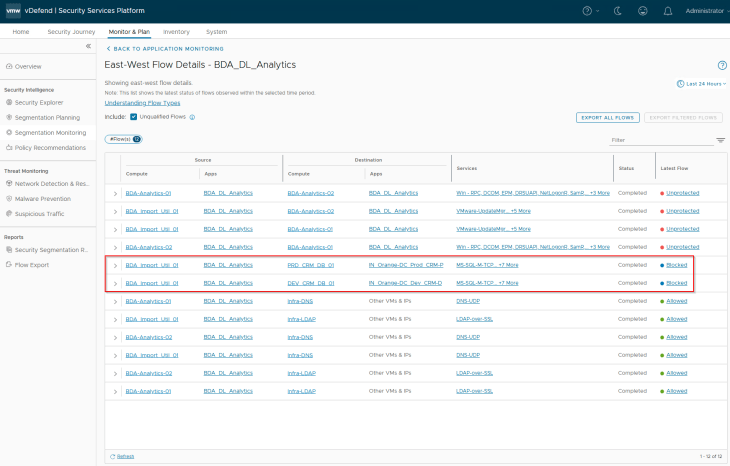
As expected, we see blocked flows from the BDA Ingestion Tier (in the BDA environment) to the CRM-Prod DB Tier (in the Prod environment) and the CRM-Dev DB Tier (in the Dev environment) due the application strategy default Deny rule for the Prod and Dev CRM applications (that we implemented in Part 6).
We also see Allowed flows to the Infrastructure services – DNS, LDAPS etc because we had the necessary infrastructure services policies implemented in the previous chapters.
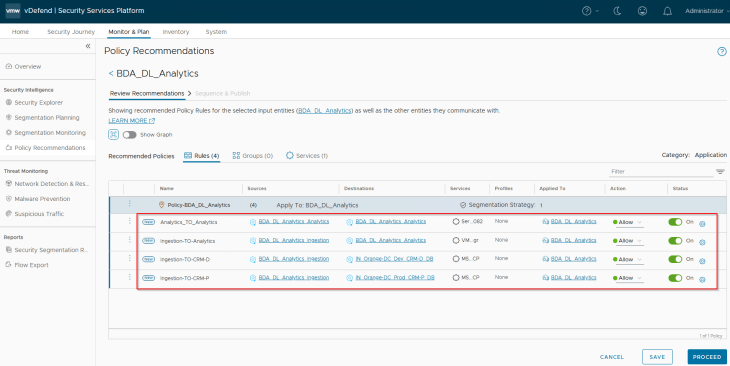
Let’s run a recommendation including a segmentation strategy with a default rule action as Drop (as we are confident about the expected flows for the application) and publish to NSX manager.
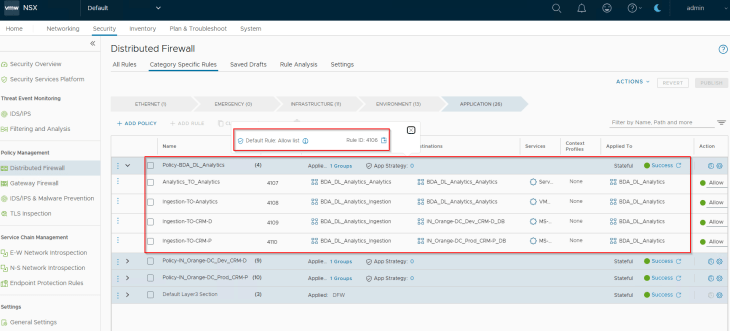
Are we done? No, remember we had some blocked flows to the CRM Prod and CRM Dev applications from the BDA Ingestion tier. We have the necessary rules in place for the DL_Analytics application to allow outbound traffic to CRM applications, but we don’t have any rules under the CRM Prod and Dev applications to allow inbound traffic from the DL_Analytics application. We need to whitelist those flows in the CRM applications as well, let’s do that next.
Adding Incremental Rules to Existing Dependent CRM Applications
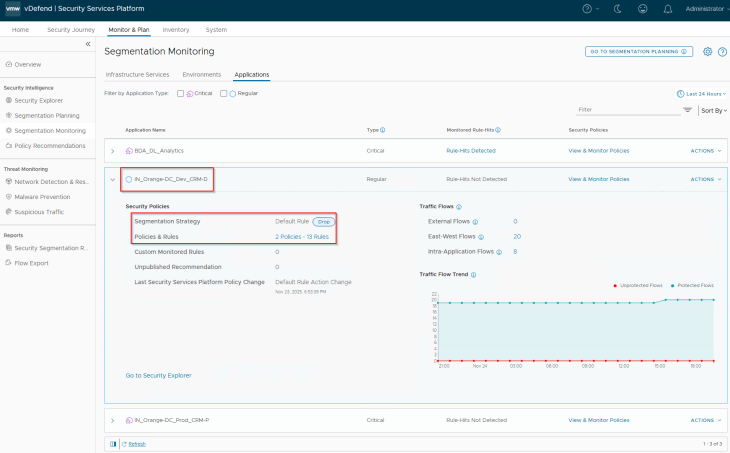
We will start with the CRM Dev application. Notice that we have a segmentation strategy with a default Drop rule applied to the policy. Flow monitoring is currently enabled on this default rule.
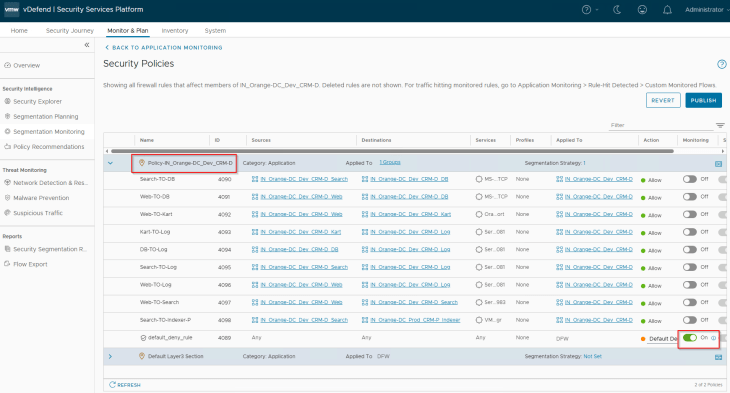
Flows from the BDA Ingestion Tier to the CRM Dev DB Tier is hitting this monitored default drop rule and are getting blocked.
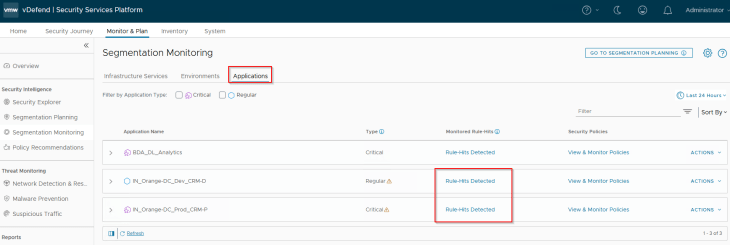
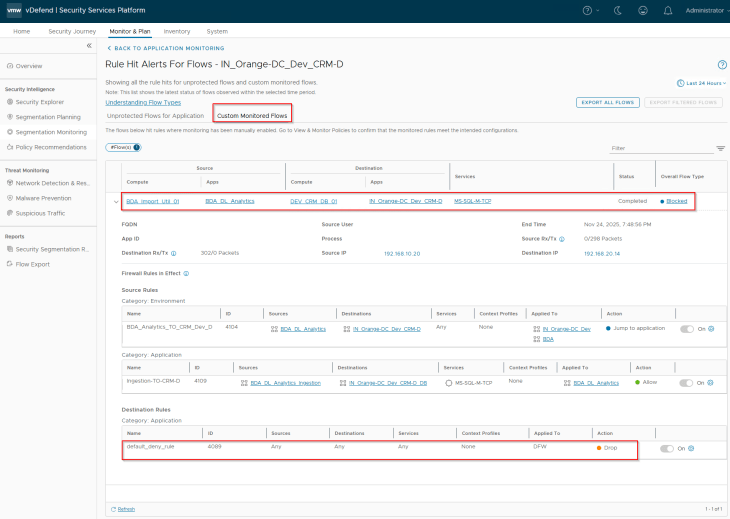
Let’s run a recommendation for the CRM Dev application.
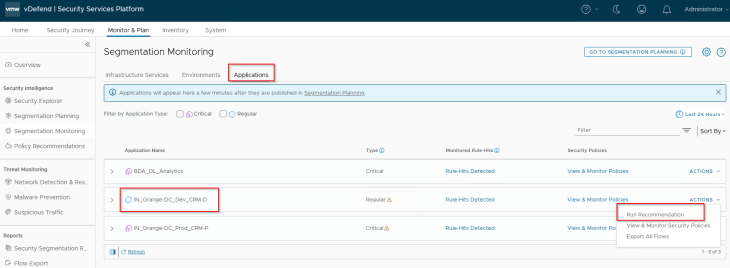
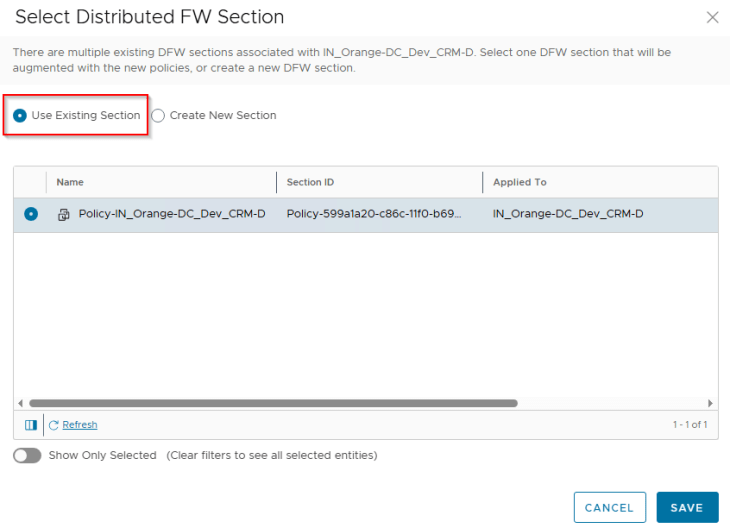
Since we already have a policy section available for the CRM Dev application, we will place the incremental rules under this policy.
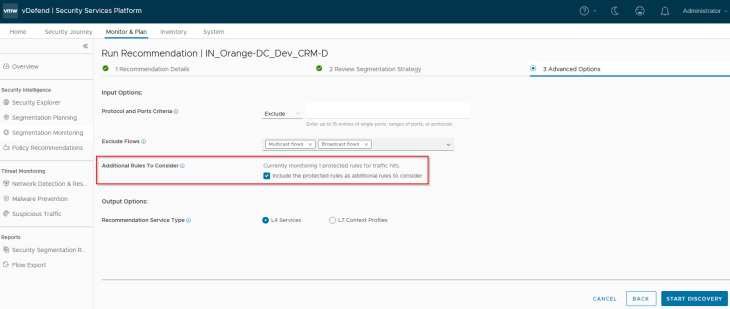
Under the Advanced Options, we will enable the flag to include Protected rules to be considered for recommendation. This is important, else recommendation will only look for unprotected flows and skip the blocked flows under the default monitored rule.
Excellent!!! We see a rule recommendation for the flow from BDA Ingestion Tier to the CRM Dev DB Tier, and we will now publish to NSX Manager.
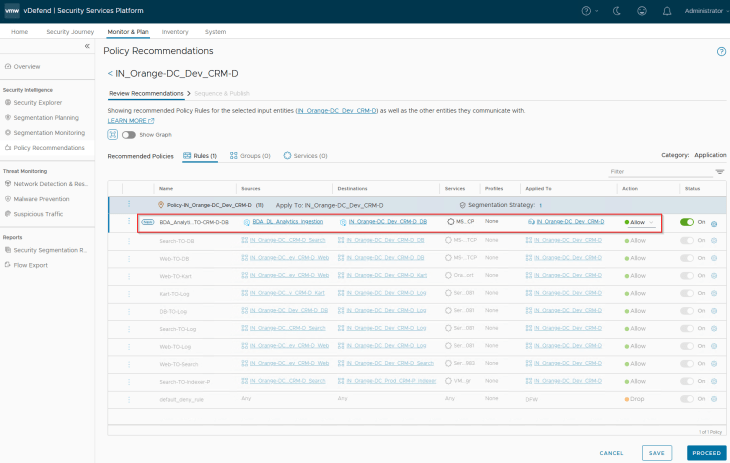
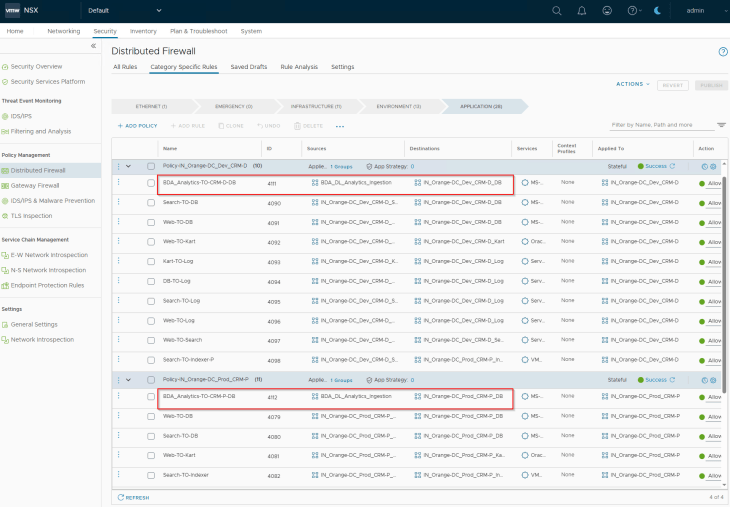
We will repeat the same steps for the CRM Prod application and upon publishing, we have the expected policy rule set for the CRM applications in NSX manager.
And finally, we will review the Security Explorer canvas for any unprotected flows.
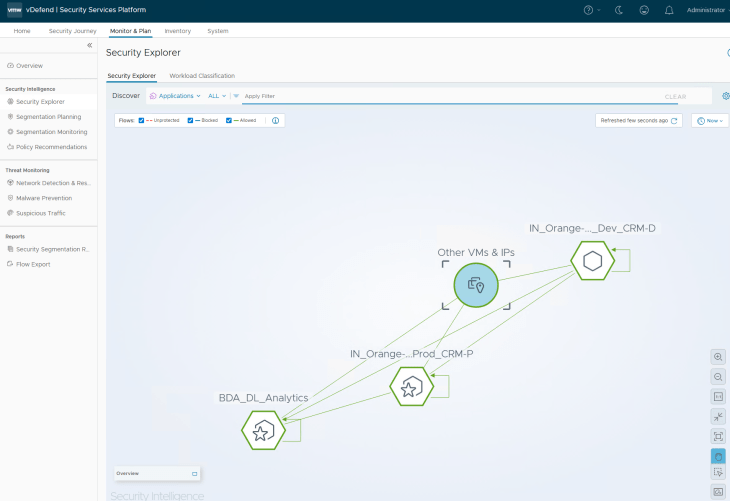
Success!!! We have now completed the segmentation journey for the Analytics application onboarded via a partial hierarchy import. Let’s conclude for now and will meet in Part 8 to cover another use case where we promote existing NSX security groups as environments and / or application assets in SSP. Stay tuned!!!
I hope the article was informative. Thanks for reading.

Continue Reading? Here are the other parts of this series:
Part 1: Introduction
https://vxplanet.com/2025/12/18/vdefend-security-services-platform-and-security-segmentation-part-1-introduction/
Part 2: Platform Deployment
https://vxplanet.com/2025/12/19/vdefend-security-services-platform-and-security-segmentation-part-2-platform-deployment/
Part 3: NSX Onboarding and Feature Activation
https://vxplanet.com/2025/12/19/vdefend-security-services-platform-and-security-segmentation-part-3-nsx-onboarding-and-feature-activation/
Part 4: Application Hierarchy Import
https://vxplanet.com/2025/12/22/vdefend-security-services-platform-and-security-segmentation-part-4-application-hierarchy-import/
Part 5: Publishing Assets and Policies
https://vxplanet.com/2025/12/22/vdefend-security-services-platform-and-security-segmentation-part-5-publishing-assets-and-policies/
Part 6: Segmentation Monitoring and Policy Recommendations
https://vxplanet.com/2025/12/23/vdefend-security-services-platform-and-security-segmentation-part-6-segmentation-monitoring-and-policy-recommendations/
Part 8: Promoting NSX Groups
https://vxplanet.com/2026/01/10/vdefend-security-services-platform-and-security-segmentation-part-8-promoting-nsx-groups/
Part 9: Handling App Scaling
https://vxplanet.com/2026/01/10/vdefend-security-services-platform-and-security-segmentation-part-9-handling-app-scaleout/
Part 10: Handling App Transitions
https://vxplanet.com/2026/01/11/vdefend-security-services-platform-and-security-segmentation-part-10-handling-app-transitions/
Part 11: DFW Rule Analysis
https://vxplanet.com/2026/01/12/vdefend-security-services-platform-and-security-segmentation-part-11-dfw-rule-analysis/


